
DR Checker vs KeywordKick
Side-by-side comparison to help you choose the right AI tool.
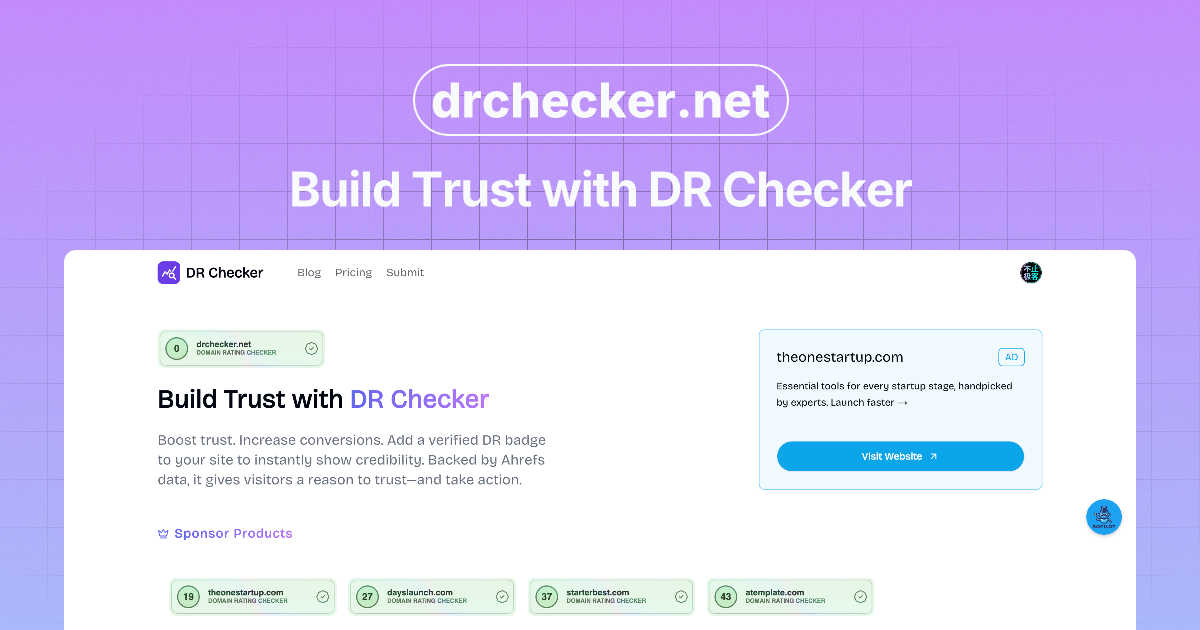
DR Checker verifies your content's accuracy to build audience trust and credibility.

KeywordKick
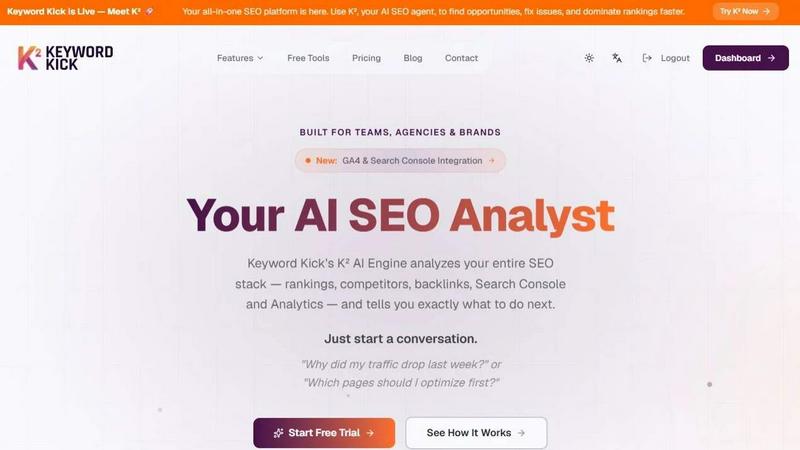
KeywordKick's K² AI agent simplifies SEO by analyzing your data to provide clear, actionable insights for improved rankings and traffic growth.
Last updated: April 13, 2026
Visual Comparison
DR Checker
KeywordKick
Feature Comparison
DR Checker
Advanced Website Crawling Engine
At the heart of DR Checker is a powerful crawling engine designed to navigate complex website architectures with precision. It systematically explores every page, following internal and external links to build a complete map of a site's connections. This deep-crawl technology ensures no problematic link is left undiscovered, whether it's buried deep within a blog archive or hidden in a seldom-updated footer, providing a truly comprehensive audit of your site's link health.
Broken Link & Error Detection
This core feature automatically identifies and categorizes links that lead to error pages, most commonly the frustrating 404 "Not Found" error. DR Checker goes beyond simple detection by classifying the type of error and pinpointing the exact source URL on your site where the broken link originates. This granular detail is essential for efficient troubleshooting, allowing users to quickly locate and fix or remove invalid links that damage user trust and hinder site navigation.
Malicious & Suspicious Link Identification
Beyond broken links, DR Checker provides a critical security layer by flagging URLs that lead to potentially harmful destinations. This includes links to known phishing sites, malware-hosting domains, or untrustworthy spam pages. By identifying these risky connections, the tool empowers website administrators to protect their visitors from security threats and prevent their own site's reputation from being tarnished by association, which can also negatively impact search engine standing.
Actionable Reporting & Insights
DR Checker transforms raw data into clear, actionable intelligence. The platform presents findings through intuitive dashboards and detailed exportable reports that prioritize issues based on severity. Each problematic link is presented with contextual information, such as the anchor text used and the status code received, enabling users to make informed decisions on whether to fix, replace, or remove a link. This turns a overwhelming list of errors into a structured maintenance plan.
KeywordKick
K² AI Agent
The K² AI Agent serves as your dedicated SEO analyst, combining data from various sources to deliver precise, actionable insights. This feature streamlines decision-making by eliminating guesswork, allowing users to focus on optimization tasks that have the highest potential impact.
Unified SEO Dashboard
KeywordKick's dashboard integrates all your SEO data into one cohesive platform, providing an overview of key metrics such as keyword rankings, site health, and backlink profiles. This unified approach makes it easier to monitor performance and identify areas for improvement.
Daily Ranking Monitoring
With KeywordKick, you can track keyword positions across multiple search engines daily, offering insights into historical trends and changes in rankings. This feature helps you understand how your SEO efforts are affecting visibility over time.
Competitor Analysis Tools
The platform includes robust competitor analysis tools that allow you to track visibility in featured snippets, People Also Ask sections, and local search results. By understanding your competitors' strengths, you can identify opportunities to outperform them in search rankings.
Use Cases
DR Checker
Pre-Launch Website Audit
Before launching a new website or a major redesign, developers and project managers use DR Checker to conduct a final, thorough sweep. This pre-launch audit identifies any broken internal links, incorrect staging URLs, or placeholder links that were accidentally left in the code. Ensuring a clean, error-free site from day one is crucial for delivering a professional first impression to users and establishing credibility with search engine crawlers immediately.
Ongoing SEO Maintenance
Digital marketers and SEO specialists integrate DR Checker into their monthly maintenance routines. Search engines penalize sites with excessive broken links, viewing them as poorly maintained. By regularly scanning and repairing these issues, professionals preserve their hard-earned search rankings, improve crawl efficiency for search engine bots, and ensure that all internal link equity is properly flowing to important landing pages, protecting their organic traffic investment.
Content Migration and Platform Updates
When migrating a website to a new Content Management System (CMS) or restructuring a large volume of old content, URLs often change, leading to widespread link breakage. DR Checker is instrumental in this process, providing a before-and-after analysis to identify every link that was affected by the migration. This allows teams to systematically implement 301 redirects or update internal links, preserving user experience and preventing catastrophic loss of SEO value.
Enhancing User Experience and Trust
Website owners and customer experience managers utilize DR Checker to proactively maintain a seamless browsing journey. For an e-commerce site, a broken link could mean a lost sale; for a news portal, it could mean a frustrated reader. Regularly purging dead ends and suspicious links ensures visitors can navigate confidently, which reduces bounce rates, increases engagement, and builds long-term trust in the site as a reliable and secure resource.
KeywordKick
Quick Traffic Recovery
When traffic drops unexpectedly, KeywordKick enables users to diagnose the issue quickly by analyzing site performance and keyword rankings. This helps teams take corrective action promptly, minimizing downtime and recovering lost traffic.
Optimizing Content Strategy
Marketers can leverage KeywordKick to identify which pages need optimization based on performance metrics and competitive analysis. This facilitates a focused content strategy that enhances visibility and engagement.
Comprehensive Site Audits
SEO teams can utilize KeywordKick to run detailed site audits, identifying technical issues and opportunities for improvement. This helps maintain site health and enhances user experience, which is crucial for ranking higher in search engine results.
Backlink Management
With KeywordKick's backlink analysis, users can monitor their backlink profiles and compare them with competitors. This feature aids in identifying valuable link-building opportunities and assessing the quality of existing links to boost authority and rankings.
Overview
About DR Checker
DR Checker is a sophisticated, web-based diagnostic platform engineered to serve as the first line of defense for a website's integrity. It functions as a comprehensive auditor, meticulously scanning a site's entire link ecosystem to identify and catalog problematic connections that undermine performance, security, and credibility. The tool is purpose-built for a diverse audience, including website owners vigilant about their brand's reputation, developers responsible for technical upkeep, and digital marketers whose strategies depend on flawless user journeys and strong SEO health. Its core value proposition lies in transforming the complex, often tedious task of link maintenance into an automated, actionable process. By leveraging advanced crawling technology, DR Checker delves deep into website structures, generating detailed reports that spotlight critical issues like broken links (404 errors), redirect chains, links to expired domains, and, crucially, connections to potentially malicious or spammy external sites. This proactive approach not only preserves a positive user experience by eliminating dead ends but also safeguards SEO rankings by ensuring search engine crawlers encounter a healthy, trustworthy link profile. The platform's intuitive interface democratizes this powerful analysis, making professional-grade website optimization accessible to users regardless of their technical expertise.
About KeywordKick
KeywordKick is an innovative AI-driven SEO platform that serves as your personal SEO agent, simplifying the complex world of search engine optimization. Unlike traditional SEO tools that overwhelm users with dashboards and reports, KeywordKick centralizes all your SEO data—ranging from Google Search Console and Analytics to keyword rankings, backlinks, and competitive insights—into a single, easy-to-navigate workspace. This means you can interact with the platform conversationally, asking questions such as "Why did my traffic drop last week?" or "Which pages should I optimize first?" The K² AI Engine analyzes your entire SEO ecosystem and provides actionable, prioritized recommendations tailored to your specific needs. This makes KeywordKick an invaluable resource for founders, marketers, and SEO teams who seek not just data, but actionable insights that drive execution and growth.
Frequently Asked Questions
DR Checker FAQ
How does DR Checker differ from free broken link checkers?
While free online tools offer basic scanning, DR Checker provides a professional-grade, in-depth analysis. It uses an advanced crawler capable of handling large, complex sites with thousands of pages and can identify a wider range of issues beyond 404 errors, including security threats, slow redirects, and links to expired domains. Furthermore, it offers organized, actionable reporting and historical tracking, which is essential for ongoing site management, rather than just a one-time list of problems.
What should I do if my DR Checker deployment is paused?
The message "This deployment is temporarily paused" typically indicates a service interruption on the provider's end, which could be for maintenance, updates, or technical adjustments. During this time, scanning and reporting functions will be unavailable. Users should wait for official communication from DR Checker regarding the resumption of service. It is advisable to check their official status page or contact support for an estimated timeline and updates on the situation.
Can DR Checker scan websites that require login credentials?
Based on its standard web-based service model, DR Checker is primarily designed to scan publicly accessible areas of a website, much like a search engine bot would. It likely does not natively handle authentication to scan password-protected pages, member areas, or staging sites behind logins. For comprehensive audits of private sections, users would need to consult the documentation or support to see if there are advanced configuration options for authenticated crawling.
How often should I run a scan with DR Checker?
The optimal scanning frequency depends on your website's size and update cadence. For large, active sites with daily content publication (like news blogs or e-commerce sites), a weekly or bi-weekly scan is recommended. For smaller, more static brochure sites, a monthly audit may be sufficient. The best practice is to schedule regular scans (e.g., monthly) and run additional audits immediately after any major content updates, migrations, or site changes to catch new issues promptly.
KeywordKick FAQ
How does KeywordKick differ from traditional SEO tools?
KeywordKick stands out by combining conversational AI with comprehensive data integration. Instead of overwhelming users with raw data, it provides actionable insights and recommendations, making SEO execution more straightforward.
Can I integrate other SEO tools with KeywordKick?
Yes, KeywordKick allows seamless integration with essential tools like Google Analytics and Search Console. This feature ensures that all your crucial SEO data is accessible in one unified workspace.
Is KeywordKick suitable for both small businesses and large enterprises?
Absolutely! KeywordKick is designed for a wide range of users, including founders, marketers, and SEO teams from small businesses to large agencies. Its scalable features make it adaptable to different needs and team sizes.
What kind of support does KeywordKick offer?
KeywordKick provides various support options, including a comprehensive knowledge base, tutorials, and customer service, ensuring that users can fully leverage the platform's capabilities and get assistance when needed.