
Doodle Duel vs SVG to 3D
Side-by-side comparison to help you choose the right AI tool.

Doodle Duel
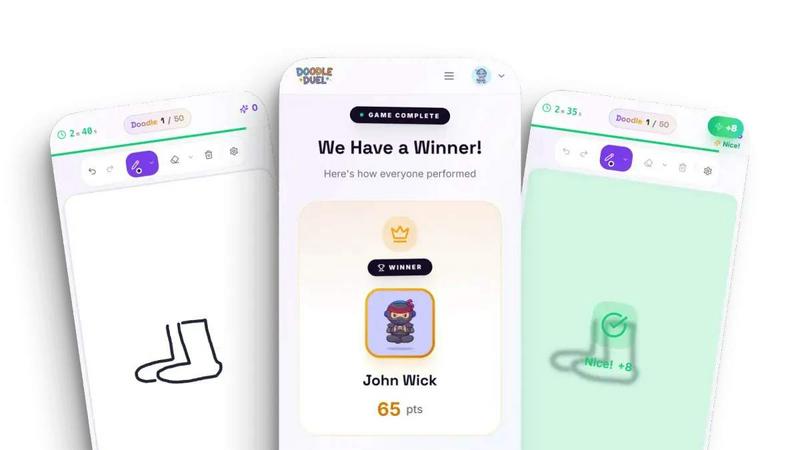
Doodle Duel lets you sketch against friends in real-time while AI judges your creativity and accuracy for free.
Last updated: February 28, 2026
SVG to 3D
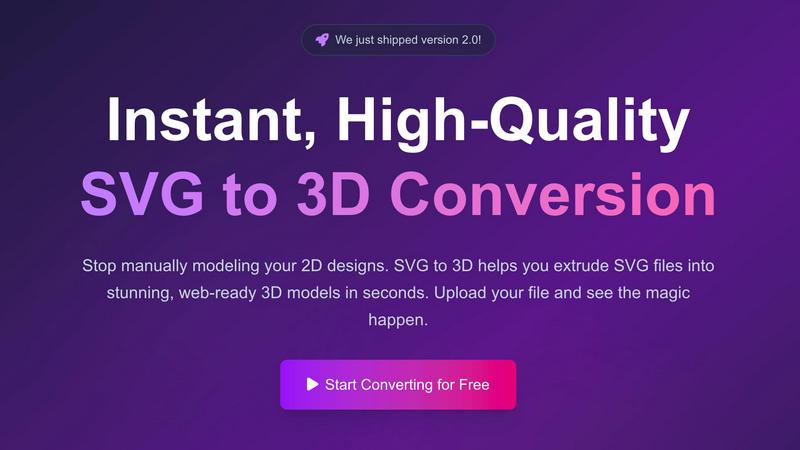
Effortlessly transform your 2D SVG designs into stunning, web-ready 3D models with advanced customization options.
Last updated: February 28, 2026
Visual Comparison
Doodle Duel
SVG to 3D
Feature Comparison
Doodle Duel
Real-Time Multiplayer Mode
Doodle Duel allows players to compete in real-time drawing battles with friends. Up to 30 players can join a single session, creating an exhilarating environment where everyone sketches the same prompts simultaneously, fostering a spirit of friendly competition.
AI Judging System
The game features an advanced AI judging system that evaluates each drawing based on accuracy, creativity, and style. This impartial judging ensures that every player has a fair chance of winning, eliminating biases associated with popularity contests and enhancing the overall gaming experience.
Quick and Easy Setup
Doodle Duel requires no downloads or sign-ups, allowing players to jump right into the action. Players can create a room, share a code with friends, and start a game in under a minute, minimizing waiting time and maximizing fun.
Solo Arcade Mode
For those looking to hone their skills or enjoy a more solitary experience, Doodle Duel offers a Solo Arcade mode. Here, players can tackle 50 levels of increasing difficulty, manage lives, and climb the global leaderboards, providing a challenging yet rewarding gameplay experience.
SVG to 3D
One-Click to GLB for the Web
With a single click, users can export their 3D models as GLB files, optimized for web use. This feature is particularly beneficial for developers who work with Three.js or React Three Fiber, allowing them to integrate 3D models seamlessly into their web projects and enhance user experiences with interactive elements.
3D-Print Ready
SVG to 3D supports clean STL exports, ensuring the models can be directly used with 3D printing slicers. This feature is invaluable for makers and designers who wish to bring their 2D creations to life in the physical world, simplifying the transition from digital design to tangible object.
Advanced Material System
This tool provides an advanced material system that allows users to apply realistic PBR materials, custom textures, and professional lighting effects. This feature enables creators to enhance their 3D models visually, making them stand out with depth and realism, suitable for both web and physical representations.
Lightning-Fast Processing
The optimized algorithms of SVG to 3D ensure that SVG files are converted into 3D models in mere seconds. This speed is crucial for professionals who require quick turnaround times, allowing them to focus on creativity rather than technical delays.
Use Cases
Doodle Duel
Perfect for Parties
Doodle Duel is an ideal choice for parties and social gatherings, where friends can engage in laughter-filled drawing battles. The game’s interactive nature brings people together, sparking creativity and friendly rivalry in a fun atmosphere.
Family Bonding Activities
Families can use Doodle Duel as a bonding activity, encouraging members of all ages to participate in drawing challenges. The game fosters creativity while allowing family members to connect and share moments of joy through artistic expression.
Team Building Exercises
Businesses and organizations can leverage Doodle Duel for team-building activities. The game promotes collaboration, creativity, and communication, making it an effective icebreaker that helps team members bond in a relaxed and enjoyable setting.
Skill Development
For art enthusiasts looking to improve their drawing skills, Doodle Duel serves as an engaging platform to practice. The timed challenges push players to think quickly and creatively, helping to refine their artistic abilities while having fun.
SVG to 3D
Create Interactive 3D Logos and Icons for Web
Web designers can effortlessly transform 2D logos and icons into interactive 3D models, adding a modern touch to their websites. By utilizing the GLB export feature, these 3D assets can enhance user engagement and provide a more immersive browsing experience.
From Digital Design to Physical Object: SVG to STL for 3D Printing
Artists and makers can convert their 2D artwork into 3D printed objects with ease. This use case is perfect for those looking to fabricate custom parts or artistic designs without needing to delve into complex CAD software, making the design process more accessible.
Add Depth to Your UI/UX Designs
Designers can leverage SVG to 3D to create depth in their UI/UX mockups. By converting SVG components into 3D models, they can present their designs with a more realistic perspective, impressing clients and stakeholders with visually compelling prototypes.
Enhance Product Visualizations
Businesses can utilize SVG to 3D for product visualizations, making it easier to showcase items in a more engaging way. Whether for e-commerce or marketing presentations, the ability to produce high-quality 3D models from 2D designs can significantly improve product appeal and customer interest.
Overview
About Doodle Duel
Doodle Duel is an innovative real-time drawing game that seamlessly merges creativity, competition, and fun. It is designed for everyone from seasoned artists to casual doodlers, allowing players to engage in thrilling drawing battles with friends without the hassle of downloads or accounts. In this exciting game, participants race against the clock to sketch their interpretation of a given prompt within a strict 60-second time limit. The twist lies in the AI judge, powered by advanced technologies such as Google Gemini or OpenAI, which evaluates each drawing and provides humorous yet fair feedback. This unique feature keeps players entertained while ensuring a level playing field. Perfect for parties, family gatherings, or casual hangouts, Doodle Duel offers flexible modes, including solo arcade journeys and chaotic multiplayer duels, catering to every preference. The game emphasizes quick thinking, creativity, and social interaction, making it an engaging experience for players of all ages.
About SVG to 3D
SVG to 3D is a cutting-edge tool designed to transform 2D SVG vector graphics into high-quality, web-ready 3D models with remarkable efficiency. Built with the needs of web developers, designers, and 3D printing enthusiasts in mind, this tool addresses the complexities and time-consuming processes associated with traditional 3D modeling software. It allows users to quickly upload SVG files, modify key attributes, and export stunning 3D models in various formats like GLB, STL, and OBJ, all within a user-friendly browser interface. The tool empowers creators to add depth and dimension to logos, icons, and other designs, making it essential for anyone looking to elevate their digital projects. With a focus on speed, quality, and ease of use, SVG to 3D provides an unparalleled experience for professionals seeking to streamline their workflows and produce top-notch 3D assets effortlessly.
Frequently Asked Questions
Doodle Duel FAQ
How do I start a game in Doodle Duel?
Starting a game is simple. Just create a room, share the room code with your friends, and you can start playing in under a minute without the need for accounts or downloads.
Is there a limit to how many players can join a game?
Yes, you can invite up to 30 players to join your drawing duel. However, only 4 players can participate in the free version, while the Pro version allows for larger groups.
What happens if I don't have artistic skills?
No artistic talent is required to enjoy Doodle Duel. The game emphasizes fun and creativity, allowing anyone to participate regardless of their drawing skills. The AI judging system ensures that everyone's efforts are fairly evaluated.
Can I play Doodle Duel on any device?
Absolutely! Doodle Duel is designed to be playable on any device with internet access. Just create or join a room, and you can start competing with friends from anywhere.
SVG to 3D FAQ
How does SVG to 3D work?
SVG to 3D works by allowing users to upload SVG files, which the tool then processes using advanced algorithms to generate 3D models. Users can adjust various settings and export their creations in multiple formats.
Is there a limit on the file size I can upload?
Yes, the maximum file size for uploading SVG files is 5 MB. This limit ensures that the processing remains efficient and quick for all users.
What formats can I export my 3D models in?
You can export your 3D models in several formats, including GLB, GLTF, OBJ, and STL. This versatility caters to various use cases, from web development to 3D printing.
Is my data secure when using SVG to 3D?
Absolutely. SVG to 3D prioritizes user privacy and security by processing files locally in your browser whenever possible, ensuring that your designs remain private and secure without being uploaded to external servers.
Alternatives
Doodle Duel Alternatives
Doodle Duel is a captivating real-time drawing game that fosters creativity and competition, allowing players to engage in thrilling drawing duels with friends. Designed for anyone from seasoned artists to casual doodlers, it offers a unique multiplayer experience where up to 30 players can join in on the fun. With its AI judging system, the game adds an exciting twist as players race against time to showcase their artistic interpretations. As users explore options similar to Doodle Duel, they may seek alternatives due to various factors, including pricing, platform compatibility, and unique features. It's essential to consider the specific needs of your group, such as the number of players, ease of use, and whether an AI judging feature is included. When selecting an alternative, look for games that maintain the balance of creativity and competition while providing an enjoyable and accessible gaming experience.
SVG to 3D Alternatives
SVG to 3D is an innovative tool designed to transform 2D SVG vector graphics into high-quality 3D models, streamlining the creative process for designers and developers. It falls under the category of AI Assistants, catering to those who seek efficient solutions for 3D modeling without the complexity of heavyweight software. Users often look for alternatives due to various reasons such as pricing, specific feature sets, or compatibility with different platforms and workflows. When considering alternatives, it's essential to evaluate aspects like ease of use, export options, and whether the tool supports the specific needs of your projects. --- [{"question": "What is SVG to 3D?", "answer": "SVG to 3D is a tool that converts 2D SVG vector graphics into high-quality 3D models."}, {"question": "Who is SVG to 3D for?", "answer": "SVG to 3D is ideal for designers, developers, and 3D printing enthusiasts who want to quickly create 3D models from 2D designs."}, {"question": "Is SVG to 3D free?", "answer": "The pricing model for SVG to 3D may vary; please check the official website for the latest information on costs."}, {"question": "What are the main features of SVG to 3D?", "answer": "Key features include one-click GLB export for web use, STL support for 3D printing, and a browser-based modeling interface with real-time previews."}]