
Dokie AI vs SimpleDraw
Side-by-side comparison to help you choose the right AI tool.

Dokie AI
Dokie AI swiftly transforms your ideas into stunning professional presentations, making PPT creation effortless and efficient with advanced AI.
Last updated: March 19, 2026

SimpleDraw
Create precise floor plans and scale drawings effortlessly online with SimpleDraw, no downloads or experience needed.
Last updated: March 1, 2026
Visual Comparison
Dokie AI

SimpleDraw
Feature Comparison
Dokie AI
AI Generate PPT
With the AI Generate PPT feature, users can describe their presentation topic in simple text. Dokie AI will then create a complete slide deck that includes professionally designed layouts, visually engaging charts, and compelling content tailored to the subject matter.
AI Beautify PPT
This feature allows users to upload existing presentations, which Dokie AI then enhances by fixing layouts, applying professional styling, and improving overall design without altering the original content. This is ideal for transforming mundane slides into captivating visual displays.
Speech Notes Generation
Dokie AI automatically generates detailed speaker notes for each slide, providing users with comprehensive talking points. This feature helps presenters deliver their content confidently and effectively, ensuring a seamless presentation experience.
Multiple Conversion Options
Dokie AI supports various document-to-PPT conversions, allowing users to transform content from different formats into presentations. This includes converting PDF files, Word documents, HTML pages, and even YouTube videos into engaging PowerPoint slides, making it a versatile tool for diverse needs.
SimpleDraw
Accurate Measurements & Scale Drawing
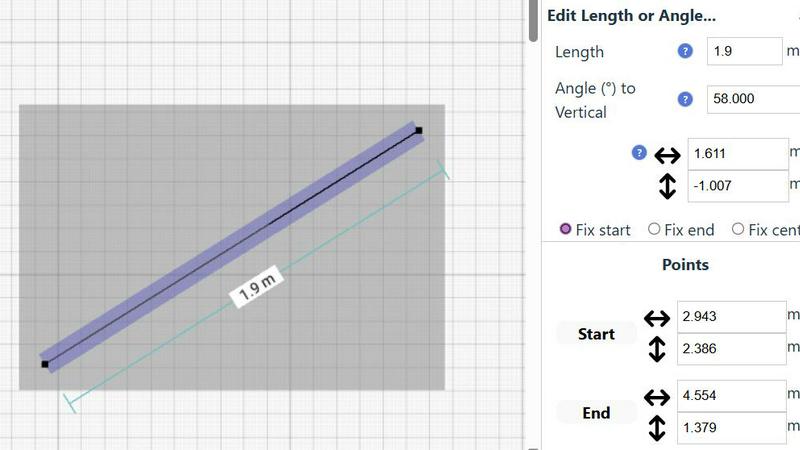
SimpleDraw ensures that every drawing is precise with its advanced measurement tools. Users can rely on smart alignment and real-time measurement feedback, allowing them to create drawings that are not only visually appealing but also accurate and to scale.
Specialized Floor Plan Creator
Designed specifically for crafting detailed floor plans, this feature includes elements like walls, doors, and windows that can be easily added with a single click. Users can visualize their spaces effectively, making it ideal for renovation or design projects.
Smart Alignment System
The smart alignment system is an intuitive feature that assists users in placing points and lines with incredible accuracy. By simply hovering the mouse in the desired area, users receive visual cues to help position elements precisely, enhancing the drawing experience.
Comprehensive Measurement System
Users benefit from a comprehensive measurement system that allows for dynamic display of contextual measurements as they work. With options for both metric and standard US units, this feature caters to a global audience, ensuring everyone can create drawings that meet their specific requirements.
Use Cases
Dokie AI
Business Presentations
For corporate professionals, Dokie AI simplifies the process of creating impactful business presentations. By inputting key information, users can quickly generate a polished deck that communicates their ideas effectively, saving time and enhancing productivity.
Educational Purposes
Educators can utilize Dokie AI to create engaging lesson slides or student presentations. The tool's ability to generate visually appealing content helps maintain student interest and facilitates better understanding of complex topics.
Marketing Campaigns
Marketers can leverage Dokie AI to craft presentations that showcase product features or marketing strategies. The AI-generated slides not only save time but also ensure that the presentation is visually aligned with brand identity and marketing goals.
Startup Pitches
Startup founders can benefit from Dokie AI when preparing pitch decks for investors. With the capability to generate professional slides quickly, founders can focus on refining their business model while Dokie AI handles the presentation design, ensuring a strong first impression.
SimpleDraw
Kitchen & Bathroom Renovations
Homeowners can utilize SimpleDraw to plan their kitchen and bathroom renovations with accurate measurements. This ensures they visualize layouts effectively before commencing work, leading to better outcomes and fewer costly mistakes.
Room Layouts & Furniture Planning
Whether it’s a bedroom, living room, or office, users can design room layouts that fit their needs. By seeing how furniture will fit within a space before purchasing, they can make informed decisions that enhance their living or working environments.
House & Apartment Plans
Real estate agents and landlords can create complete floor plans for homes and apartments. These plans can be utilized in rental listings or for space planning, making it easier to attract potential tenants or buyers.
Community-Driven Development
SimpleDraw invites users to participate in its community-driven development model. By joining the Discord community, users can share feedback, suggest features, and be a part of the product's evolution, ensuring that it continues to meet the needs of its users.
Overview
About Dokie AI
Dokie AI is an innovative AI-powered presentation maker designed to assist business professionals, educators, marketers, and startup founders in creating polished and visually appealing presentations without needing advanced design skills. Leveraging the capabilities of Claude Opus 4.6, Dokie AI generates presentation slides by analyzing textual input and automatically determining the best layout, typography, and visual design elements. This tool is tailored for users who may lack design expertise but require high-quality presentations quickly. Whether you need to create a presentation from scratch, enhance existing slides, or convert documents to PowerPoint format, Dokie AI offers a range of functionalities to streamline the entire process, making it an invaluable asset for effective communication in various professional settings.
About SimpleDraw
SimpleDraw is a groundbreaking online platform that revolutionizes the way individuals engage with technical drawing. By offering a user-friendly interface combined with professional-grade precision, it caters to a diverse audience, including casual users, DIY enthusiasts, homeowners, and small business operators. The core value proposition of SimpleDraw lies in its ability to deliver accurate and detailed scale drawings without the complexity and cost associated with traditional CAD software. This tool enables users to create floor plans, room layouts, and technical sketches effortlessly, all within a web browser—eliminating the need for software installation or account creation. With its focus on accessibility and simplicity, SimpleDraw empowers users to visualize their ideas confidently, ensuring that every measurement is precise and to scale. Whether you're planning a renovation or arranging furniture, SimpleDraw makes drafting accessible to everyone, allowing creativity to flourish without technical barriers.
Frequently Asked Questions
Dokie AI FAQ
What types of documents can I convert to PPT using Dokie AI?
Dokie AI allows users to convert a variety of documents into PowerPoint presentations, including PDFs, Word files, HTML pages, and even YouTube videos, providing flexibility for different content formats.
How does Dokie AI ensure the quality of generated presentations?
Dokie AI utilizes advanced AI algorithms, powered by Claude Opus 4.6, to analyze content and apply optimal design principles, ensuring that generated presentations are not only visually appealing but also contextually relevant.
Can I edit the presentations created by Dokie AI?
Yes, users can edit the presentations generated by Dokie AI. The platform provides tools for real-time editing and customization, allowing users to tweak content and design elements to meet their specific needs.
Is there a trial version available for Dokie AI?
While the current content does not specify a trial version, users can explore the features of Dokie AI through pay-as-you-go pricing plans that offer flexibility and affordability, making it easy to test the service before committing long-term.
SimpleDraw FAQ
Is SimpleDraw completely free to use?
Yes, SimpleDraw is entirely free and requires no software installation or account registration. Users can start drawing immediately in their web browser.
What types of projects can I create with SimpleDraw?
SimpleDraw is versatile and can be used for various projects, including floor plans, room layouts, furniture arrangements, and technical sketches for DIY projects or renovations.
Do I need any prior experience to use SimpleDraw?
No prior experience is necessary. SimpleDraw is designed to be intuitive and user-friendly, making it accessible for casual users and beginners alike.
Can I collaborate with others while using SimpleDraw?
Currently, SimpleDraw does not support real-time collaboration features; however, users can share their drawings easily by exporting them or sharing links, facilitating collaboration in a more traditional manner.
Alternatives
Dokie AI Alternatives
Dokie AI is a cutting-edge AI presentation maker designed to help users create polished and professional PPT slides efficiently. As part of the design tools category, it caters to business professionals, educators, marketers, and startup founders, enabling them to generate visually appealing presentations without prior design expertise. Users often seek alternatives to Dokie AI due to various reasons, such as pricing concerns, specific feature requirements, or compatibility with different platforms. When searching for an alternative to Dokie AI, it's essential to consider factors such as ease of use, the range of features offered, and the pricing structure. Look for tools that provide a mix of AI-powered generation capabilities, customization options, and user support to ensure a seamless presentation creation experience that meets your unique needs.
SimpleDraw Alternatives
SimpleDraw is a free online tool designed for creating accurate scale drawings and floor plans effortlessly. It falls into the category of design tools, specifically tailored for users who need precise drafting capabilities without the complexity of traditional CAD software. Many users seek alternatives to SimpleDraw for various reasons, including the desire for additional features, more advanced functionalities, or compatibility with different platforms. Furthermore, some may be looking for tools that cater to specific project needs or personal preferences in user experience. When searching for an alternative, consider important factors such as ease of use, available features, platform compatibility, and the overall cost. It is essential to evaluate whether the alternative maintains the balance between precision and accessibility that users appreciate in SimpleDraw, ensuring that it can effectively support their project goals without introducing unnecessary complexity.