
conceptviz vs Supermachine
Side-by-side comparison to help you choose the right AI tool.

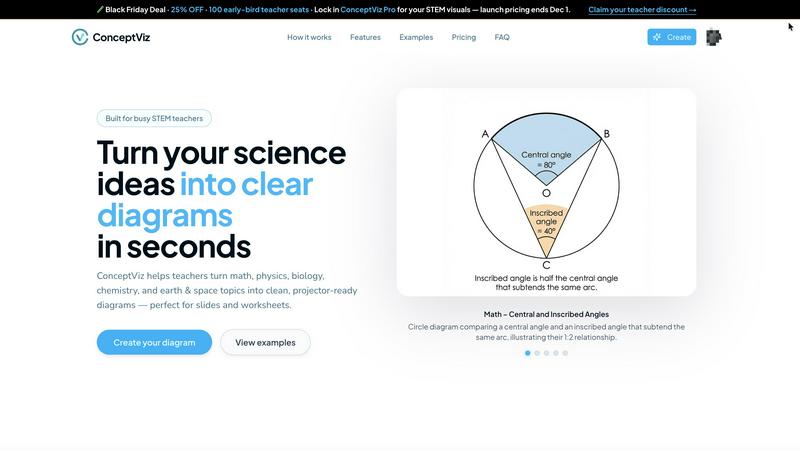
ConceptViz instantly creates clear, classroom-ready science and math diagrams from your text descriptions.
Last updated: February 28, 2026

Supermachine
Supermachine empowers creators to effortlessly generate stunning, commercial-ready AI images and videos using over 60 advanced models.
Last updated: March 18, 2026
Visual Comparison
conceptviz
Supermachine

Feature Comparison
conceptviz
Subject & Grade-Level Presets
ConceptViz is built with pedagogical intelligence, offering quick-start presets for core STEM subjects including Physics, Biology, Chemistry, Earth & Space, and Math. Crucially, these presets are tuned with grade-level awareness, working with U.S. grade bands like elementary, middle, and high school. This ensures the generated diagram's complexity, terminology, and detail are automatically appropriate for the intended audience, eliminating the need for manual simplification or complex redesign.
Projector-Ready Clarity & Design
Every diagram is engineered for maximum legibility in real educational environments. ConceptViz prioritizes thick, high-contrast lines and large, readable labels against simple, uncluttered backgrounds. This design philosophy minimizes visual noise, guaranteeing that visuals stay sharp and comprehensible whether displayed on a classroom projector from a distance or examined closely on a printed handout, ensuring no student misses a key detail.
Slide & Worksheet Friendly Output
The tool is designed for seamless integration into existing educational workflows. Diagrams are generated in a widescreen aspect ratio ideal for modern presentation slides (PowerPoint, Google Slides) and come with clean, light backgrounds perfect for printing on worksheets. Users can download high-resolution PNG images and instantly paste them into their teaching materials without any need for cropping, resizing, or reformatting.
Context-Aware AI Generation
At its core, ConceptViz uses AI fine-tuned to understand STEM terminology and instructional context. When a user describes a diagram in plain English (e.g., "convex lens ray diagram with object between F and 2F"), the AI interprets the request with subject-matter accuracy. This goes beyond simple icon placement; it understands relationships, standard labeling conventions, and appropriate representations to create a diagram that is not just an image, but a correct visual explanation.
Supermachine
ControlNet
ControlNet is an advanced feature that allows users to maintain precise control over their image generation process. By providing a framework for adjusting parameters, creators can fine-tune their outputs to match specific artistic visions, ensuring that each image aligns closely with their desired aesthetics.
Instruction Model
The Instruction Model simplifies the creative process by enabling users to input natural language commands. This feature translates user instructions into actionable outputs, making it easier for individuals without technical backgrounds to create sophisticated visual content with minimal effort.
Video Generation
The Video Generation feature empowers creators to produce dynamic video content quickly. Users can transform static images into engaging videos, complete with transitions and effects, all within mere seconds. This capability is particularly beneficial for marketers and social media managers looking to enhance their visual storytelling.
AI Edit Image (Photoshop AI)
The AI Edit Image feature brings powerful editing capabilities right to your fingertips. With tools that allow for seamless manipulation of images, users can enhance, alter, or completely transform their visuals as if they were using professional-grade software, but with much greater speed and ease.
Use Cases
conceptviz
Accelerating Lesson Preparation for Teachers
STEM teachers can transform lesson planning from a scavenger hunt for suitable images into an efficient creation process. Instead of spending hours searching stock sites or clumsily drawing in basic software, they can generate precise, tailored diagrams for their specific lesson plan in seconds. This allows for more dynamic, responsive teaching where visuals perfectly match the day's learning objectives and the teacher's unique explanatory approach.
Creating Differentiated Learning Materials
Educators can quickly produce multiple versions of a diagram to support differentiated instruction. For example, a biology teacher can generate a simple plant cell diagram for introductory students and a more detailed, organelle-rich version for advanced learners using the same core prompt adjusted for grade level. This enables customized support within inclusive classrooms without multiplying prep time.
Enhancing Academic Papers and Research Presentations
Graduate students and researchers can use ConceptViz to produce clean, publication-quality figures for papers, theses, and conference presentations. The tool's ability to generate precise technical diagrams—like a detailed titration setup or a mitosis sequence—based on a descriptive prompt saves significant time compared to using complex vector software, allowing researchers to focus on their science rather than graphic design.
Supporting Student Projects and Study Aids
Students can leverage ConceptViz to create accurate visuals for their own science fair projects, study guides, or presentation assignments. By describing a concept they are learning, they can generate a professional diagram to reinforce their own understanding and improve the quality of their work. This empowers students to become active creators of their learning resources.
Supermachine
Social Media Management
Social media managers can leverage Supermachine to generate eye-catching graphics and videos to keep their feeds fresh and engaging. With the ability to create content in under 15 seconds, they can maintain a consistent posting schedule without sacrificing quality.
Marketing Campaigns
Marketers can utilize Supermachine to craft compelling visuals for their campaigns. From promotional ads to engaging thumbnails, the platform's AI tools enable them to produce high-quality content that resonates with their target audience, all while saving time and resources.
Digital Art Creation
Artists exploring digital mediums can benefit from Supermachine’s AI capabilities to inspire new concepts or refine existing ideas. Whether creating NFTs or digital illustrations, the platform serves as a versatile tool that enhances creativity and productivity.
Small Business Advertising
Small business owners can create effective advertisements without needing extensive graphic design knowledge. Supermachine allows them to generate professional-looking visuals that capture attention and communicate their brand message clearly, making advertising more accessible than ever.
Overview
About conceptviz
ConceptViz is a specialized AI-powered diagram generator engineered to transform abstract STEM concepts into crystal-clear, classroom-ready visuals. It directly addresses the chronic time sink and frustration educators face when sourcing or creating accurate scientific illustrations. The platform serves a core mission: to turn a simple text description into a projector-ready diagram in seconds. Its primary value proposition is not just speed, but context-aware accuracy and pedagogical suitability. It is meticulously built for STEM teachers, curriculum developers, students, and academic researchers who require precise, legible, and instructionally sound visuals. Unlike generic design tools or cluttered stock photo sites, ConceptViz is fine-tuned with subject-specific presets (Physics, Biology, Chemistry, Earth & Space, Math) and grade-level awareness, ensuring the output matches the complexity required for an elementary lesson versus a graduate-level paper. By focusing on high-contrast lines, readable labels, and minimal visual noise, it guarantees that diagrams remain effective from the front row to the back of a classroom or within a printed worksheet, fundamentally shifting lesson prep from a chore of visual hunting to a seamless act of creation. It empowers users to generate custom, accurate diagrams that perfectly match their specific teaching narrative or research focus, saving hours of preparation time.
About Supermachine
Supermachine is your all-in-one creative studio, revolutionizing the way creators produce high-quality images and videos through the power of artificial intelligence. It caters to individuals across a spectrum of skill levels—from novice creators to seasoned professionals—making it accessible for everyone. The platform significantly streamlines the creative process, allowing users to generate impressive stock photos, illustrations, thumbnails, NFTs, and short-form videos in less than 15 seconds. This efficiency is bolstered by a user-friendly interface that eliminates the need for complex prompt engineering, empowering users to focus on creativity rather than technicalities. Trusted by over 100,000 creators who collectively generate a million images weekly, Supermachine sets itself apart with a carefully curated selection of over 60 high-performing AI models. Instead of integrating every new tool on the market, the platform prioritizes reliability and effectiveness, ensuring that every project yields top-tier results. Whether you are a social media manager crafting daily posts or a small business owner developing ads, Supermachine is designed to elevate your creative capabilities effortlessly.
Frequently Asked Questions
conceptviz FAQ
What makes ConceptViz different from other AI image generators?
Unlike general-purpose AI art tools, ConceptViz is specifically fine-tuned for STEM education and research. It prioritizes factual accuracy, pedagogical appropriateness, and classroom-ready design over artistic style. Features like subject presets, grade-level awareness, and output optimized for projectors and handouts are built specifically for educational use cases, which generic tools do not address.
Do I need any design or drawing skills to use it?
No design or drawing skills are required. The entire process is driven by text description. You simply select your subject and grade level, type a plain-English description of the diagram you need, and ConceptViz generates a complete, formatted visual. The platform is built specifically for educators and researchers, not graphic designers.
What file formats are available for download?
ConceptViz provides high-resolution PNG downloads. This format is universally compatible with all major presentation software (like PowerPoint and Google Slides), document editors, and is ideal for both digital display and high-quality printing on worksheets or paper handouts.
Can I use the generated diagrams for commercial purposes, like in a textbook?
The provided content indicates a focus on classroom, research, and personal educational use. For definitive licensing terms regarding commercial publication, such as in textbooks or commercial curricula, users should consult ConceptViz's official Terms of Service or license agreement, as these rights can vary and are typically clarified by the provider.
Supermachine FAQ
How quickly can I create images and videos with Supermachine?
You can create stunning images and videos in under 15 seconds, thanks to Supermachine's powerful AI tools designed for speed and efficiency.
Is Supermachine suitable for beginners?
Absolutely! Supermachine is designed for creators of all skill levels, making it easy for beginners to produce professional-quality content without needing advanced technical skills.
What types of content can I create with Supermachine?
You can create a wide range of content, including stock photos, illustrations, thumbnails, NFTs, and short-form videos, all tailored to your specific needs.
How many AI models does Supermachine offer?
Supermachine features a curated selection of over 60 high-performing AI models, ensuring that users have access to reliable and effective tools for their creative projects.
Alternatives
conceptviz Alternatives
ConceptViz is a specialized AI-powered tool in the content creation and data visualization category, designed to generate clear, classroom-ready science and math diagrams from simple text prompts. It stands out by focusing on pedagogical accuracy and projector-ready clarity for STEM educators. Users often explore alternatives for various reasons, such as budget constraints, the need for different subject matter beyond STEM, or a requirement for more advanced design customization and editing features. Platform compatibility and specific workflow integrations are also common deciding factors. When evaluating an alternative, consider its core specialization versus general-purpose design capabilities. Key criteria include the accuracy and appropriateness of generated content for your audience, the tool's ease of use and speed, output quality for your intended medium (like projection or print), and the overall value relative to its cost and learning curve.
Supermachine Alternatives
Supermachine is a cutting-edge creative studio that leverages artificial intelligence to help users swiftly generate professional-quality images and videos. It falls under the design tools category, catering to a diverse range of creators, from social media managers to small business owners. As users explore their creative options, they often seek alternatives due to various reasons, including pricing, feature sets, and platform compatibility. Many are looking for tools that better align with their specific needs, whether that be enhanced simplicity, additional functionalities, or more flexible pricing structures. When searching for alternatives to Supermachine, users should consider several key factors. The ease of use is paramount, especially for those without technical expertise. Additionally, the variety and performance of AI models offered, as well as the speed of content generation, are critical aspects to evaluate. Finally, user support and community engagement can significantly enhance the overall experience, making it easier to navigate challenges and maximize the potential of the chosen tool.