
BlitzCut vs One More Shot AI
Side-by-side comparison to help you choose the right AI tool.

BlitzCut
BlitzCut transforms raw videos into polished posts by automatically removing silence and adding stylish captions in.
Last updated: February 28, 2026

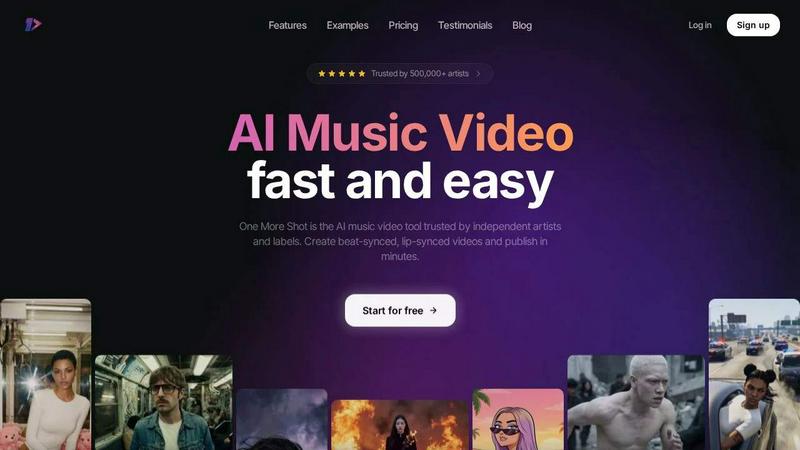
One More Shot AI
One More Shot AI instantly transforms your songs into professional, lip-synced music videos, empowering artists with an AI production crew.
Last updated: April 4, 2026
Visual Comparison
BlitzCut

One More Shot AI
Feature Comparison
BlitzCut
Automatic Silence Removal
BlitzCut's Automatic Silence Removal feature uses AI to detect and eliminate pauses in your videos instantly. This eliminates the tedious manual process that typically consumes 15-20 minutes, allowing you to focus on the creative aspects of your project. The result is a seamless viewing experience that keeps your audience engaged without unnecessary dead air.
AI Captions
Crafting captions can be a labor-intensive task, but BlitzCut simplifies this with its AI Captions feature. Achieving over 95% accuracy, the tool automatically generates styled captions that enhance the visual appeal of your videos. This feature is designed to save time while ensuring that your content remains accessible and engaging.
Text-Based Editing
With BlitzCut's Text-Based Editing, you can make quick adjustments to your videos by simply deleting sentences from the generated transcription. This innovative approach allows for an intuitive editing experience that caters to both novice and experienced editors. You can refine your content effortlessly without needing to scrub through timelines.
Mobile-First Experience
BlitzCut is built with a mobile-first mindset, ensuring that users can edit videos directly from their iPhone or iPad. The app is designed for speed and efficiency, allowing you to import, edit, and export videos in under two minutes. Whether you are on the go or at home, BlitzCut delivers a powerful editing experience right at your fingertips.
One More Shot AI
AI Artist & Identity Consistency
This feature allows users to create a persistent virtual artist or character that can star across multiple videos and social media content. By uploading a single photo or providing a detailed text description, the AI learns and maintains that identity's visual characteristics. This ensures brand and artistic consistency, making an artist instantly recognizable whether in a full music video or a short-form social clip, effectively building a cohesive visual persona without the need for repeated filming or expensive CGI.
Auto Videos (AI Production Crew)
Emulating a full-scale film crew, this automated workflow handles the entire video creation process. Users simply input their song and a reference image for style guidance. The AI then analyzes the audio, interprets its structure and mood, and generates a complete, edited music video complete with dynamic, beat-synced visuals. This feature is designed for speed and simplicity, delivering a polished visual product in minutes, ideal for rapid content creation and testing creative concepts.
Precise Project Mode Editing
For creators who demand detailed control, Project Mode provides a comprehensive editing suite. It allows users to deconstruct auto-generated videos or build sequences from scratch with granular precision. Creators can edit individual shots, adjust timing frame-by-frame to perfectly match musical cues, modify prompts for specific scenes, and orchestrate complex visual narratives. This transforms the platform from an automated tool into a powerful, director-led studio for crafting bespoke visual stories.
Top Notch AI Lip-Sync (Seedance 2.0)
A critical component for believable performance videos, this feature utilizes advanced lip-syncing technology (noted as Seedance 2.0) to ensure vocals match the artist's mouth movements naturally. The AI analyzes the audio track's vocal waveform and animates the subject's lips with high accuracy, syncing to the rhythm and phrasing of the lyrics. This eliminates the uncanny valley effect often seen in generated content, making singing scenes appear authentic and professionally produced.
Use Cases
BlitzCut
Content Creators
For vloggers and social media influencers, BlitzCut offers a streamlined editing process that allows for quick turnaround times on video content. Creators can easily remove silence and add captions, making their videos more engaging and ready for platforms like TikTok, Instagram, and YouTube.
Educational Videos
Teachers and educators can leverage BlitzCut to create dynamic learning materials. By using the AI tools to swiftly edit lecture recordings, they can focus on presenting valuable information while ensuring their videos are polished and professional.
Marketing Professionals
In the fast-paced world of marketing, timely content is crucial. BlitzCut provides marketing teams with the ability to produce high-quality promotional videos in minutes, enhancing their outreach efforts and ensuring that they remain agile in their campaigns.
Online Course Creators
For those developing online courses, BlitzCut simplifies the video editing process, allowing course creators to focus on content quality. By automating tedious tasks, they can dedicate more time to instructional design and less to technical editing challenges.
One More Shot AI
Independent Artist Music Video Production
For solo musicians and bands without label backing, this tool bypasses the need for costly film shoots, locations, and editors. An artist can produce a compelling, visually engaging official music video to accompany a single release on platforms like YouTube and Spotify. This elevates their professional presentation, helps capture audience attention, and can be a key asset in pitching to playlist curators and industry professionals.
Social Media Content & Snippets
Artists can rapidly generate multiple format-specific clips from a single track to fuel their social media strategy. This includes creating vertical snippets for TikTok and Instagram Reels, square videos for Instagram posts, and horizontal clips for YouTube Shorts or Facebook. This constant stream of fresh, on-brand visual content keeps audiences engaged, promotes new releases, and drives traffic to streaming platforms.
Lyric Video Creation
Beyond full narrative videos, the platform is perfectly suited for creating dynamic lyric videos. By using the precise editing controls, creators can time visual effects, scene changes, and text appearances to highlight specific lyrics and musical drops. This provides fans with a deeper connection to the song's message and serves as highly shareable, accessible content that emphasizes the artistry of the songwriting itself.
Prototyping and Creative Concepting
Songwriters and producers can use the tool to quickly visualize a track's potential before committing to a high-budget production. By generating multiple video styles from different reference images, they can experiment with moods, aesthetics, and narratives. This helps in refining the song's visual identity, pitching ideas to collaborators or labels, and making more informed creative decisions for future traditional video shoots.
Overview
About BlitzCut
BlitzCut is a revolutionary AI-powered video editing tool designed specifically for content creators who demand speed without sacrificing quality. Our mission is to make professional video editing accessible to everyone, from casual influencers to seasoned filmmakers. BlitzCut streamlines the editing process by utilizing advanced artificial intelligence to automate time-consuming tasks like silence removal and caption generation. This allows creators to focus on what they do best—making engaging content. With a mobile-first approach, BlitzCut is optimized for iPhone, iPad, and Mac users, ensuring that you can edit on the go. The platform’s unique features cater to the fast-paced creator economy, transforming raw footage into polished videos ready for social media in just two minutes. Join the growing community of creators who are embracing a faster, more efficient way to share their stories.
About One More Shot AI
One More Shot AI represents a paradigm shift in the creative process for musicians and visual artists, dismantling the traditional barriers to high-quality video production. At its core, it is a sophisticated web and mobile platform engineered to transform audio tracks into fully realized, AI-powered music videos. The product serves a critical need for independent artists, creators, and music marketers who possess the audio but lack the immense budget, time, or technical crew required for conventional filmmaking. Its primary value proposition is democratization: delivering professional-grade, beat-synced visual experiences through an intuitive interface. By analyzing a song's intrinsic properties—its rhythm, energy, and emotional mood—the platform's AI acts as a virtual production team. Users can opt for a swift, automated workflow, simply uploading a song and a reference image to generate a complete video in minutes. For those seeking artistic precision, advanced tools offer granular, scene-by-scene and frame-by-frame control. This duality of speed and creative flexibility, combined with outputs tailored for social media (vertical, horizontal, square), makes it an indispensable tool for modern music promotion, artist branding, and captivating audience engagement in a visually saturated digital landscape.
Frequently Asked Questions
BlitzCut FAQ
How does BlitzCut automate the editing process?
BlitzCut utilizes advanced AI algorithms to automatically detect and remove silence from videos and generate accurate captions. This significantly reduces the time spent on manual editing tasks, allowing creators to focus on content creation.
Is BlitzCut available on all devices?
BlitzCut is primarily designed for iPhone, iPad, and Mac users. It offers a mobile-first experience that ensures you can edit videos efficiently regardless of your location.
What social media platforms does BlitzCut support for exporting?
BlitzCut allows you to export your edited videos directly to popular social media platforms, including TikTok, Instagram, and YouTube, ensuring a seamless posting experience.
Can I use BlitzCut without creating an account?
Yes, BlitzCut is free to download and does not require an account to start editing. This makes it accessible for all creators looking to streamline their video editing workflow.
One More Shot AI FAQ
What music platforms or sources does One More Shot AI work with?
The platform is designed to be highly flexible with audio input. It works seamlessly with AI-generated music from platforms like Suno and Udio, as well as tracks exported from Digital Audio Workstations (DAWs) such as FL Studio and Ableton Live. You can also use songs from streaming services by providing the audio file, and it supports direct integration for creating videos specifically for Suno and Udio tracks, as highlighted on their website.
Do I need any video editing experience to use this tool?
No, prior video editing experience is not necessary to get started. The "Auto Videos" feature is built for complete beginners, automating the entire process from audio analysis to final render. However, for users who wish to dive deeper, the "Precise Project Mode Editing" offers advanced controls that will benefit from a more detailed creative vision, but the interface is designed to be intuitive for learning.
How good is the lip-syncing feature really?
The lip-syncing, powered by the updated Seedance 2.0 model, is noted as being among the best available. It is engineered to produce natural-looking mouth movements that are tightly synchronized to the timing and phonetics of the vocals. While perfection can vary with audio clarity and the reference image, it is a standout feature specifically developed to make AI-generated singing performances look convincing and professional.
Can I use the videos commercially for my music?
Yes, the primary use case is for artists to create commercial content for their own music. You retain the rights to the music you input, and the generated video is intended for your promotional use, such as releasing on streaming platforms, social media, and for artist branding. It is always recommended to review the platform's specific Terms & Conditions regarding content rights and usage.
Alternatives
BlitzCut Alternatives
BlitzCut is an AI-powered video editor designed for content creators who need to produce engaging videos quickly. By automating tasks like silence removal and caption generation, it streamlines the editing process, making it easier for users to focus on creativity rather than technical details. However, users often seek alternatives due to various factors, including pricing, specific feature requirements, or compatibility with different platforms. When searching for an alternative to BlitzCut, it's essential to consider aspects such as ease of use, the range of automation features, and the speed of the editing process. Assessing whether the alternative meets mobile needs is also vital, as many creators prefer mobile-first solutions for editing on the go. Ultimately, the right choice should empower creators to enhance their workflow without compromising quality or creativity.
One More Shot AI Alternatives
One More Shot AI is a specialized tool in the AI content creation space, designed to transform audio tracks into synchronized music videos. It caters primarily to musicians and creators seeking to bypass traditional, costly video production by leveraging artificial intelligence to generate mood-matching, beat-synced visuals. Users often explore alternatives for various reasons. These can include budget constraints, a need for different feature sets like more granular editing or specific AI model access, or simply a preference for a different user interface or platform compatibility. The search for the right tool is highly personal and project-dependent. When evaluating other options, key considerations should be the level of creative control offered, the quality and consistency of the AI-generated visuals, the strength of audio synchronization features, and the flexibility of output formats for different social platforms. The ideal platform balances ease of use with the depth required for professional-looking results.