

Tradepal
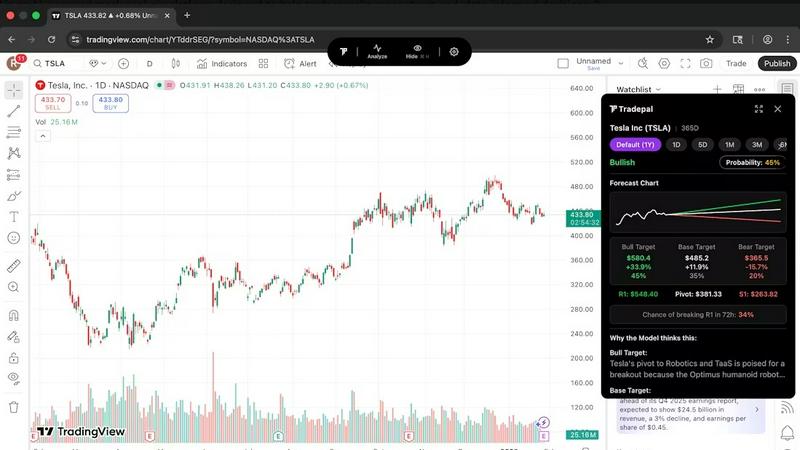
Tradepal leverages AI to transform stock chart screenshots into actionable insights with clear price targets and.
About Tradepal
Tradepal is an advanced AI-powered trading assistant designed specifically for active traders and investors seeking efficient and objective chart analysis. It allows users to analyze any U.S.-listed stock chart seamlessly, either by clicking the 'Analyze' button while viewing the chart or uploading a screenshot via its web app. Tradepal employs sophisticated algorithms to identify critical technical patterns, pinpoint support and resistance levels, assess trend strength, and evaluate momentum. The platform then generates actionable insights, including clear bullish, base, and bearish scenarios, complete with confidence scores and price targets. Unlike conventional trading platforms, Tradepal does not execute trades but serves as a valuable second opinion, helping traders validate their ideas, minimize emotional bias, and make well-informed decisions. Tailored for traders who want to integrate AI assistance into their existing workflows, Tradepal operates in harmony with popular charting platforms, ensuring a fast, lightweight, and user-focused experience.
Features of Tradepal
AI Forecasts
Tradepal provides real-time intraday forecasts that help traders anticipate ranges, reversals, and volatility. This feature utilizes a blended AI ensemble that updates continuously, allowing users to identify potential risks before they manifest in price movements.
Price Cone Projections
With Tradepal, users can visualize forward price cones directly on their charts. The fast and intuitive layout allows traders to personalize their views according to individual styles, saving these configurations for future trading sessions.
News and Sentiment Analysis
This feature aggregates market sentiment from professional trader sources and financial news into a single stream. Users can monitor shifts in crowd conviction, gaining insights before significant market moves occur, thus enhancing their trading strategies.
Breakout Signals
Tradepal identifies early signals of strength or weakness by scanning live sentiment streams, order flow hints, and momentum shifts across selected stocks. This feature enables traders to act on critical developments swiftly, giving them a competitive edge.
Use Cases of Tradepal
Enhancing Chart Analysis
Traders can utilize Tradepal’s AI capabilities to enhance their chart analysis, gaining quick insights into potential market movements without the need for extensive manual analysis. This is particularly useful during fast-paced trading sessions.
Risk Management
By leveraging the AI forecasts and price projections, traders can better manage their risk exposure. Understanding potential price movements and volatility allows them to set appropriate stop-loss orders and position sizes.
Validating Trading Ideas
Tradepal acts as a second opinion for traders looking to validate their strategies or trading ideas. By analyzing charts and providing confidence scores, it aids in affirming or re-evaluating their approaches based on data-driven insights.
Monitoring Market Sentiment
Active traders can use Tradepal to keep track of prevailing market sentiment and news, enabling them to make informed decisions based on real-time data. This is especially valuable during earnings reports or significant market events.
Frequently Asked Questions
How do I use Tradepal?
After signing up, download the Tradepal application for macOS or Windows. When viewing a U.S.-listed stock chart on any platform, simply click the 'Analyze' button, and Tradepal will provide instant insights based on the chart.
Is Tradepal financial advice?
Tradepal is not a financial advisor. It provides data-driven insights and analysis based on algorithmic assessments of stock charts but does not offer personalized financial advice.
What charts are compatible with Tradepal?
Tradepal is compatible with any U.S.-listed stock chart from various platforms. Users can analyze charts from their preferred trading platform or upload screenshots directly to the web app for analysis.
Do I need trading experience to use Tradepal?
No prior trading experience is required to use Tradepal. Its user-friendly interface and real-time insights make it accessible for both novice and experienced traders looking to enhance their trading decisions.
Explore more in this category:
Similar to Tradepal

Hishab
Hishab is business software for Bangladeshi shops and SMEs — POS billing, inventory, customer due, accounting, and reports in one system.


IZIPAY
IZIPAY is a virtual and physical crypto card service that lets users top up with digital assets and pay online like with a regular card.

SnapPChart
SnapPChart grades a trading chart screenshot A+ to F, with an entry, stop, targets, and risk/reward. Works on stocks, forex, crypto, futures.

Venduris
Venduris is a renewal intelligence platform that gives mid-size companies control over SaaS & AI contract renewals before leverage disappears.
