

Storyloft
Storyloft empowers authors to effortlessly write, edit, format, and publish their books all in one intuitive AI-driven platform.
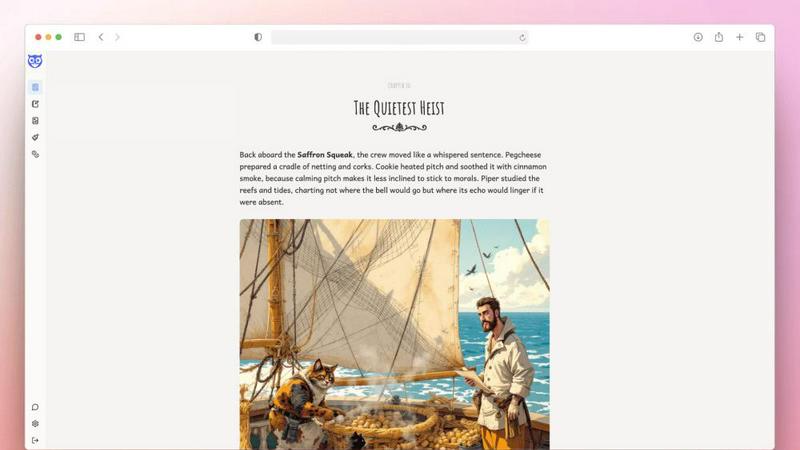
About Storyloft
Storyloft is an innovative AI-native writing application designed specifically for authors, facilitating the entire book creation journey from initial drafts to final publication. Unlike conventional writing tools that often rely on a disjointed array of software, Storyloft offers a comprehensive, unified platform where authors can seamlessly write, edit, design, and publish their manuscripts. Central to this experience is Eddy, a sophisticated manuscript-aware AI that comprehends the context of your writing. This allows it to provide tailored suggestions that enhance your narrative while preserving your unique voice and maintaining structural coherence. Storyloft is not just about drafting; it also includes features for organizing chapters, managing notes, and structuring your manuscript effectively within a purpose-built editor designed specifically for book writing. With additional tools for character and scene illustration, as well as built-in book cover design capabilities, Storyloft empowers authors to bring their creative visions to life. Once the manuscript is polished, Storyloft simplifies the publishing process with professional formatting for both print and ebook formats, enabling authors to export clean, production-ready files without ever leaving the platform.
Features of Storyloft
Eddy AI Assistant
Eddy is a manuscript-aware AI that reads your work in context, providing tailored suggestions that enhance your writing. It ensures your voice remains intact while improving structure and continuity, making it an invaluable tool for authors focused on long-form writing.
Purpose-Built Editor
The editor in Storyloft is specifically designed for book writing, allowing authors to organize chapters and manage notes efficiently. This dedicated functionality helps maintain coherence and facilitates a smoother writing workflow compared to standard document editors.
AI-Powered Illustration Tools
Storyloft includes advanced illustration tools for character and scene creation, allowing authors to visualize their narratives. These features help bring stories to life, enhancing the reader's experience without requiring separate design software.
Professional Formatting
Once your manuscript is complete, Storyloft simplifies the publishing process with professional formatting options for both print and ebook versions. Authors can export production-ready files with proper layout and styling directly from the platform, streamlining the publishing journey.
Use Cases of Storyloft
Novel Writing
Storyloft is ideal for novelists looking to draft, edit, and publish their work in one cohesive environment. The AI-driven suggestions and organization tools help maintain narrative flow and structure throughout the writing process.
Non-Fiction Projects
Authors of non-fiction can leverage Storyloft's auto-citation feature and research hub to manage sources effectively. This functionality supports thorough research while keeping content organized and coherent, making it easier to produce well-documented works.
Young Adult Fiction
Storyloft's character creator and scene illustration tools are perfect for authors writing young adult fiction. These features allow for creative exploration and development of relatable characters and engaging settings, enhancing storytelling for younger audiences.
Self-Publishing
For self-publishing authors, Storyloft offers a complete solution from drafting to publication. With professional formatting and easy export options, authors can produce high-quality ebooks and print books without the hassle of multiple software tools.
Frequently Asked Questions
What makes Storyloft different from other writing tools?
Storyloft stands out because it integrates all aspects of the writing process into one platform, from drafting and editing to design and publication. Eddy, the AI assistant, provides context-aware feedback specifically tailored for long-form writing.
Can I use Storyloft for non-fiction writing?
Yes, Storyloft is well-suited for non-fiction authors. It includes features such as auto-citations and a research hub that help manage sources and organize information effectively, ensuring your content is well-supported and coherent.
Is there a limit to how much I can write with Storyloft?
While you can start writing for free with access up to 5,000 words, additional features and unlimited writing capabilities are available with paid plans, giving you the flexibility to write as much as you need.
How does the publishing process work in Storyloft?
Once your manuscript is finalized, Storyloft allows you to format it professionally for both print and ebook formats. You can export clean, production-ready files directly from the platform, making the publishing process straightforward and efficient.
Similar to Storyloft


TypeFire
Free text expander, Markdown notes app and clipboard manager for Mac and Chrome

Leadeon
AI growth tool for X and LinkedIn: write posts in your voice, schedule at your best times, find leads on X and see what works.

Riff
Riff writes replies, DMs and posts with Gemini Nano inside Chrome. Runs on your computer, no account or API key, and never posts for you.

Memorable Contact
Memorable Contact helps you remember people, save conversation details, find contacts using AI-powered search, and share digital business cards easily

Clever AI Humanizer
Clever AI Humanizer is a free tool that makes AI-generated text sound more human.

sorry text repeater
Say sorry 100, 1,000, or 10,000 times — free apology text generator with emojis and custom layouts.

Insta Bio
InstaBio is a free Instagram bio generator offering stylish Unicode fonts, attitude lines, and Hindi devotional bios (Radhe Krishna, Mahadev).