

ProcessSpy
ProcessSpy is a powerful process monitor for Mac that delivers in-depth insights and advanced filtering for optimal performance tracking.
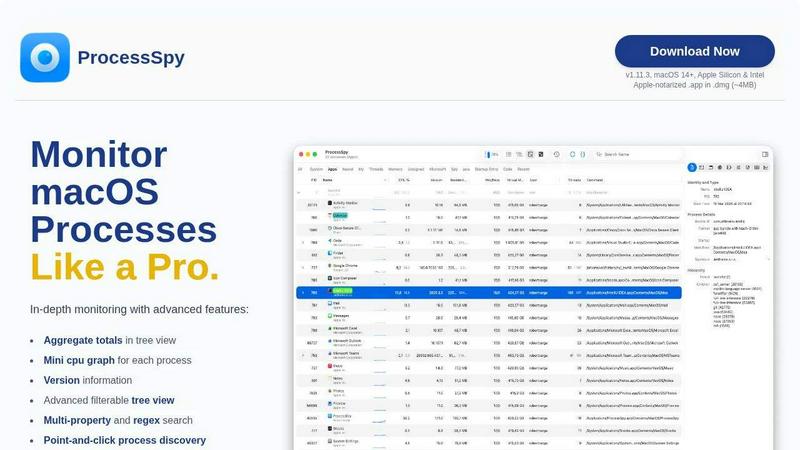
About ProcessSpy
ProcessSpy is an advanced process monitoring tool designed specifically for macOS users, providing an experience that goes beyond the standard utilities like Activity Monitor. It is ideal for developers, system administrators, and power users who require in-depth insights into running processes on their machines. Unlike traditional tools that often leave out critical information, ProcessSpy allows users to visualize process trees, inspect open files, and examine environment variables, giving them a comprehensive view of system activities. With features such as multi-property search and JavaScript-based filters, ProcessSpy empowers users to engage with their system processes intelligently. Its native design ensures a fast and responsive experience, making it an essential tool for anyone looking to manage and monitor macOS processes effectively.
Features of ProcessSpy
Advanced Tree View
The advanced tree view feature provides a detailed hierarchical representation of processes, allowing users to see real-time CPU, Memory, and Thread usage aggregated at various levels. This enables quick identification of resource-heavy processes and helps in efficient system management.
JavaScript Filters
ProcessSpy supports JavaScript-based filters, allowing users to create complex and tailored search conditions. This feature empowers users to define precise filtering criteria, making it easier to locate processes based on multiple attributes and conditions.
Advanced Process Info
With a simple click, users can access advanced information about any process, including entitlements, Info.plist, and bundle ID. This comprehensive data is essential for developers and IT professionals who need to understand more about the applications running on their systems.
Process History Recording
The ability to record process history is a powerful feature of ProcessSpy. It tracks historical values for CPU, Memory, and Thread usage, enabling users to analyze trends over time. This data can also be exported to CSV for further analysis or reporting purposes.
Use Cases of ProcessSpy
Development Environment Monitoring
Developers can utilize ProcessSpy to monitor various Java applications running on their systems. The ability to see full command-line information and version details helps in distinguishing between different instances, ensuring that the correct JDK is used for each application.
System Performance Analysis
System administrators can leverage ProcessSpy to analyze resource consumption on macOS systems. By examining the detailed metrics and aggregated values, administrators can identify bottlenecks and optimize system performance for better efficiency.
Debugging and Troubleshooting
When issues arise, ProcessSpy serves as an invaluable tool for troubleshooting. By inspecting open files and environment variables, users can diagnose problems more effectively, leading to quicker resolutions and reduced downtime.
Historical Performance Review
The process history recording feature is particularly beneficial for reviewing performance over time. Users can analyze trends in CPU and memory usage, allowing for proactive system management and informed decision-making when it comes to resource allocation.
Frequently Asked Questions
Is ProcessSpy safe to install on my Mac?
Yes, ProcessSpy is Apple-notarized and distributed as a signed .app inside a .dmg file. This ensures that it is verified and safe for use on both Intel and Apple Silicon Macs, providing peace of mind for users.
Does ProcessSpy support older versions of macOS?
No, ProcessSpy is specifically designed for macOS 14 and newer versions. Users with older macOS versions will need to upgrade to access this powerful tool.
What is the license model for ProcessSpy?
The license for ProcessSpy is valid for one user across unlimited devices, and it includes lifetime updates and new features. This model ensures that users can continue to benefit from enhancements without additional costs.
Can I try ProcessSpy before purchasing?
While the details about a trial version are not specified, users are encouraged to explore the tool's capabilities through the official website or support channels to gain a better understanding of its features before making a purchase.
Similar to ProcessSpy


Product Launch Checklist
A free launch checklist for SaaS, apps, AI tools and more. Every step says why it matters and when you can skip it.

Sprite Sheet Maker
A free browser-based toolkit for creating, cutting, converting, and previewing sprite sheet animations.


laya.tools
A free directory of 950+ projects built on Laya, the open-source decision model. Updated daily.

Forms Plugin
The #1 Native Form Builder Plugin for Framer - No Code, No Embeds, No External Platforms.

