

KPI Studio
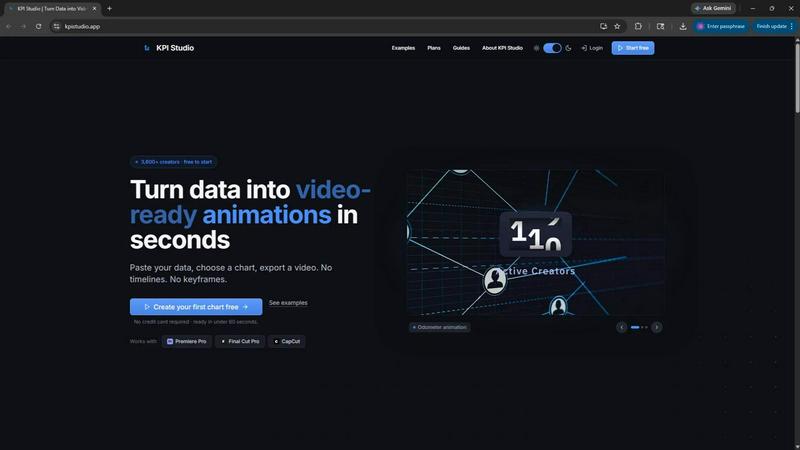
KPI Studio transforms your data into polished video animations in seconds, streamlining your workflow without the hassle of design tools.
About KPI Studio
KPI Studio is a revolutionary tool designed specifically for data-driven video creators who require dynamic charts but lack the time and expertise for traditional motion design. This innovative platform streamlines the often cumbersome workflow of creating data visuals for videos, eliminating the need for slow freelancers, complex software like After Effects, or basic static images that may look unprofessional. With KPI Studio, users can simply paste their data, select from a variety of chart types, and export a fully animated, video-ready visual in less than 60 seconds. The solution is tailored for creators on tight publishing schedules, ensuring that when you need a chart, it is ready to go. Additionally, for those looking for more advanced workflows, KPI Studio supports JSON export, allowing for deeper editing and seamless integration into custom video pipelines. With over 3,600 creators already benefiting from its capabilities, KPI Studio is transforming how data is represented in video content.
Features of KPI Studio
Quick Data Input
KPI Studio allows users to paste their data directly into the platform. This streamlined process eliminates the need for extensive setup and lets creators focus on what they do best—producing engaging video content.
Variety of Chart Types
Users can choose from a wide array of customizable chart types, including animated growth counters, bar charts, and line charts. This flexibility ensures that creators can find the perfect visual representation for their specific data needs.
Fast Export Options
With KPI Studio, creators can export their visuals in multiple formats, including MP4, GIF, and MOV with transparent backgrounds. This feature enables seamless integration into popular video editing software like Premiere Pro, Final Cut Pro, and CapCut without additional editing.
JSON Export for Advanced Users
For those who require more detailed editing capabilities, KPI Studio offers JSON export functionality. This allows users to integrate their charts into custom workflows and make adjustments as needed, providing greater control over the final output.
Use Cases of KPI Studio
Social Media Content Creation
KPI Studio is ideal for social media marketers who need to produce engaging video content quickly. By animating key performance indicators, they can capture audience attention and improve overall engagement rates on platforms like Instagram and TikTok.
Educational Videos
Educators and eLearning developers can utilize KPI Studio to create informative videos that visually present data. By incorporating animated charts, they enhance viewer comprehension and retention of complex information.
Client Presentations
Marketing agencies and consultants can use KPI Studio to prepare stunning client presentations that showcase data-driven insights. The ability to produce high-quality visuals in less than a minute allows for last-minute adjustments and timely delivery.
YouTube Channel Growth
Content creators on YouTube can leverage KPI Studio to illustrate growth metrics, subscriber counts, and revenue statistics. The dynamic visuals not only make the content more engaging but also help in building a stronger connection with the audience.
Frequently Asked Questions
What kind of data can I input into KPI Studio?
Users can input various types of numerical data, including statistics related to sales, audience growth, and other key performance indicators. The tool is designed to convert this data into animated visuals effectively.
How long does it take to create a visual with KPI Studio?
Creating a visual with KPI Studio takes less than 60 seconds. Simply paste your data, customize your chosen chart, and export it for use in your video projects without any complicated setup.
Is there a limit to the number of exports I can perform?
KPI Studio offers different pricing tiers. The free plan allows for three animated exports, while the Creator Pack and Pro versions provide additional export options without watermarks and in higher resolutions.
Can I integrate KPI Studio with my existing video editing software?
Yes, KPI Studio exports visuals in formats compatible with popular video editing software like Premiere Pro, Final Cut Pro, and CapCut. This ensures a smooth workflow without the need for extensive additional editing.
Similar to KPI Studio


CloutStack
Curated directory of tools for influencers engaged with the creator economy

The Kingdom of English
AI English for classrooms, built by a teacher.


Kirkify
Kirkify AI instantly transforms any photo into viral Charlie Kirk memes using advanced face swap and AI video tools for creators and marketers.

Meme Picture
Meme Picture uses AI to turn selfies and pet photos into classic memes in seconds, with free daily generations and no login required.

CreatorlaneHQ
CreatorlaneHQ is an all-in-one Instagram toolkit that automates DMs and sales, turning comments into revenue through a link-in-bio storefront.