

JustPDF
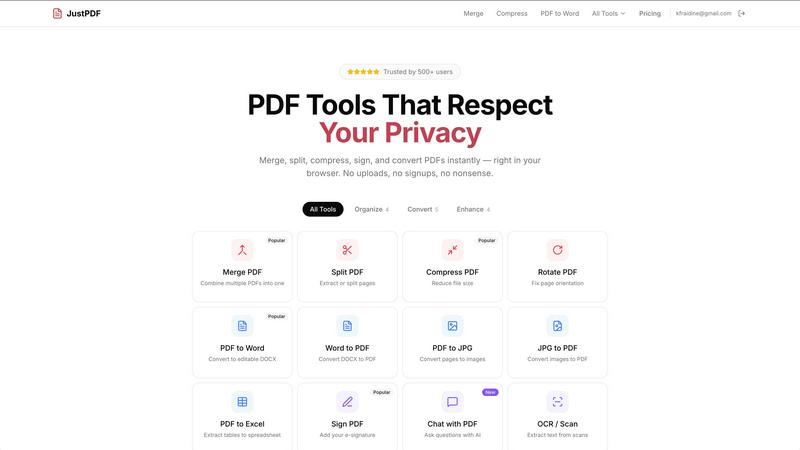
JustPDF is a private, browser-based toolkit offering 17 essential PDF tools that work entirely on your device.
About JustPDF
JustPDF redefines online PDF manipulation by placing user privacy and security at the forefront of its design. It is a comprehensive suite of 17 professional-grade tools that operates entirely within the user's web browser. This fundamental architectural choice distinguishes it from mainstream competitors like Smallpdf and iLovePDF, which typically require uploading files to remote servers for processing. By leveraging advanced JavaScript and WebAssembly technology, JustPDF performs all operations—from merging and compressing to converting and signing—locally on the user's own device. This means sensitive documents, whether confidential business contracts, academic papers, or personal identification, never leave the computer. The privacy claim is transparently verifiable by users themselves via the browser's Developer Tools Network tab, which shows no external file transfers. Catering to a wide audience including privacy-conscious professionals, students under FERPA regulations, remote workers with unreliable internet, and any individual wary of cloud storage risks, JustPDF offers a powerful, free tier with daily operations and a straightforward, affordable Pro plan for unlimited access.
Features of JustPDF
100% Browser-Based Processing
This is the cornerstone feature of JustPDF. All PDF tools are executed directly within your web browser using client-side JavaScript and WebAssembly. This architecture ensures that your files are processed on your local machine without ever being uploaded to an external server. You can confirm this privacy guarantee by opening your browser's Developer Tools and monitoring the Network tab during any operation, observing zero file uploads to JustPDF's servers.
Comprehensive PDF Tool Suite
JustPDF provides a robust collection of 17 essential tools covering organization, conversion, and advanced manipulation. This includes standard utilities like Merge, Split, Compress, and Rotate, alongside more specialized functions such as Flattening forms, Unlocking secured PDFs, converting to and from formats like Word, JPG, and Excel, and handling modern image formats like WebP and HEIC. This breadth eliminates the need to juggle multiple websites for different PDF tasks.
AI-Powered Chat with PDF
Moving beyond basic editing, JustPDF integrates an AI-driven "Chat with PDF" feature. This allows users to interact conversationally with their documents. You can ask the AI to summarize content, extract specific data points, answer questions based on the text, or explain complex sections. This tool transforms static PDFs into interactive sources of information, boosting productivity for research and analysis.
Offline Functionality & No Account Required
A significant advantage is the ability for core tools to work offline after the initial page load, thanks to the browser-based technology. Furthermore, users can immediately access the free tier without creating an account or providing an email address. This removes barriers to entry, speeds up simple tasks, and further enhances user privacy by minimizing data collection points.
Use Cases of JustPDF
Handling Sensitive Legal or Business Documents
Lawyers, consultants, and business professionals frequently handle confidential contracts, merger documents, and financial reports. Using JustPDF to compress, merge, or sign these files ensures that sensitive information remains entirely on their secured device, mitigating the risk of a data breach associated with cloud-based processing services.
Academic and Student Work Under FERPA
Educational institutions and students in the U.S. must comply with FERPA regulations protecting student records. A professor compiling research papers or a student merging scholarship application materials can use JustPDF confidently, knowing that academic records are not being stored or processed on third-party servers, thus maintaining compliance and ethical data handling.
Quick Workflows for Remote or Traveling Professionals
Individuals working from cafes, airports, or regions with poor or metered internet connectivity benefit immensely. The offline capability and local processing mean tasks like converting a report to PDF or signing a timesheet can be completed without waiting for uploads or relying on a stable connection, ensuring productivity anywhere.
Everyday Personal Document Management
For personal use, such as combining scanned receipts for tax purposes, converting a recipe image to PDF, or reducing the file size of a scanned passport copy to email it, JustPDF offers a simple, private solution. The drag-and-drop interface and immediate access without sign-ups make it ideal for these ad-hoc, privacy-sensitive tasks.
Frequently Asked Questions
Is JustPDF really free, and what are the limits?
Yes, JustPDF offers a genuinely free tier that requires no account creation. Users can perform up to 3 operations per day for free across all tools. These free operations do not impose watermarks on output files. For users requiring unlimited access, a Pro subscription is available starting at a low monthly cost.
How does JustPDF protect my privacy compared to other online tools?
JustPDF's protection is technical and verifiable. Unlike most online tools that upload your file to their cloud servers for processing, JustPDF runs all code in your browser. Your file's data stays in your device's temporary memory (RAM) during the operation and is never transmitted over the internet. You can independently verify this by the absence of file upload requests in your browser's Network tab.
What is the "Chat with PDF" feature and how does it work?
The "Chat with PDF" feature uses artificial intelligence to allow you to interact with your document conversationally. After processing the text in your PDF locally, you can ask questions in natural language, such as "What are the key findings?" or "Summarize the second chapter." The AI will analyze the content and provide direct answers, making it a powerful tool for digesting long reports, research papers, or manuals.
Do I need to install any software or plugins?
No installation is required. JustPDF works entirely within your modern web browser (like Chrome, Firefox, Edge, or Safari). There is no need to download software or install browser extensions. Simply visit the JustPDF website, and the application loads in your browser, ready to use with full functionality.
Pricing of JustPDF
JustPDF operates on a freemium model. The free tier is robust, allowing 3 operations per day without any need for an account, and outputs are free of watermarks. For power users, the Pro subscription offers unlimited use of all 17 tools. Pro plans start at an affordable rate of $4 per month, providing a cost-effective solution for individuals and professionals who require regular, unrestricted PDF manipulation with the highest standard of privacy.
Explore more in this category:
Similar to JustPDF

JevModel
Bilingual Jev decision workbench with original guides for structured, AI-assisted decisions.

Novastart
Apps and files on an infinite canvas where people and AI agents work together.

Memorable Contact
Memorable Contact helps you remember people, save conversation details, find contacts using AI-powered search, and share digital business cards easily

Sayble
AI copilot that tells you what to say next on live sales calls, then writes the recap and follow-up.

Product Launch Checklist
A free launch checklist for SaaS, apps, AI tools and more. Every step says why it matters and when you can skip it.

Kody Tools
Free collection of online developer utilities, code formatters, and digital converters designed to streamline your daily workflow.

tally counter
Browser-based gamepad diagnostic tool for testing controller buttons, analog sticks, triggers, D-pad controls, and input detection.

Forms Plugin
The #1 Native Form Builder Plugin for Framer - No Code, No Embeds, No External Platforms.