

Hundred times copy and paste
Generate heartfelt messages or repeat any text up to 1000 times instantly for effortless copy and paste on social media.
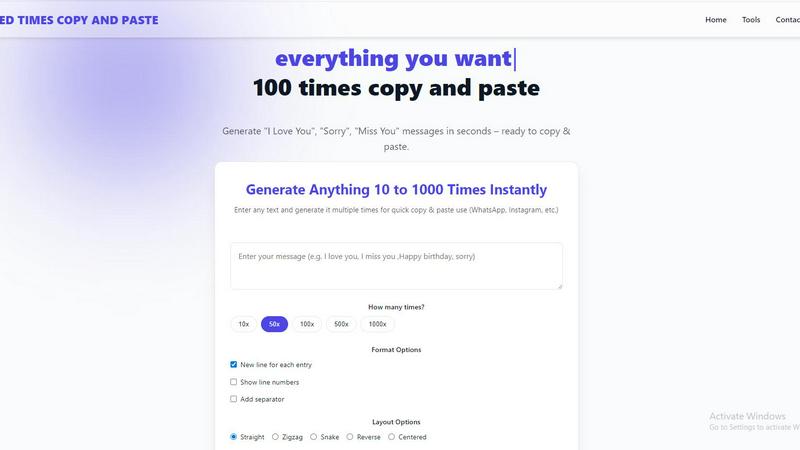
About Hundred times copy and paste
Hundred times copy and paste is a specialized online utility tool designed to solve a unique and surprisingly common problem: the need to generate repeated text messages quickly and efficiently. At its core, the tool allows users to input any word, phrase, or sentence and instantly replicate it a specified number of times, ranging from a modest 10 repetitions up to an impressive 10,000. The product's name, while suggesting a hundred, actually undersells its true capacity, as it empowers users to generate massive blocks of repeated text with just a single click. This tool is for anyone who wants to add a dramatic, humorous, or heartfelt flair to their digital communications, moving beyond bland, single-line messages. Its primary value proposition lies in its ability to transform a simple sentiment, like "I Love You" or "Sorry," into a powerful, visually overwhelming statement that captures attention and conveys deep emotion. The tool is not just about repetition; it is about amplifying expression in an era where digital messages often feel impersonal and fleeting. By offering preset examples for common occasions like birthdays, apologies, and congratulations, it caters to a wide demographic, from teenagers wanting to prank their friends to partners seeking a romantic gesture. Ultimately, Hundred times copy and paste turns a mundane task into a creative act, making it a go-to resource for anyone looking to communicate with more impact and less effort.
Features of Hundred times copy and paste
Flexible Repetition and Customization
This core feature allows users to define the exact number of times their text is repeated, with quick-select buttons for 10x, 50x, 100x, 500x, and 1000x, as well as the option to manually input any number up to 10,000. This granular control ensures that the output perfectly matches the user's intent, whether it's a subtle 10-time reminder or an overwhelming 1000-time declaration. The flexibility extends to formatting, with options to add new lines between each entry, show line numbers for easy reference, and insert a custom separator, giving users complete command over the final layout of their generated text.
Diverse Layout Options for Visual Impact
Beyond simple repetition, the tool offers a range of layout styles that fundamentally change how the repeated text is visually presented. Users can choose from a standard "Straight" list, a playful "Zigzag" pattern, a flowing "Snake" layout, a "Reverse" order, or a "Centered" alignment. This feature transforms a block of text from a monotonous list into a visually engaging pattern, making the message more dynamic and interesting to read. It is particularly useful for social media posts or chat messages where visual presentation can enhance the emotional or humorous impact of the repeated phrase.
Ready-to-Copy Presets for Instant Use
To eliminate any friction in starting, the tool provides a library of pre-configured "Quick Examples" and "Ready-to-Copy Presets." These presets cover the most common use cases, including "I Love You," "Sorry," "Miss You," "Happy Birthday," "Good Morning," "Thank You," "Congratulations," and "Get Well Soon." Each preset comes with multiple stylistic variations, such as "Romantic Hearts," "Cute Sorry," or "Party Style," which incorporate emojis and different phrasing. Users can simply click a preset, select the desired repetition count, and copy the generated text directly, requiring zero setup or configuration.
One-Click Copy and Download Functionality
The tool streamlines the entire workflow from generation to usage with two key features: a prominent "Copy" button and a "Download .txt" option. The "Copy" button instantly places the entire generated text onto the user's clipboard, ready to be pasted into any messaging app, social media platform, or document. The "Download .txt" feature allows users to save the generated text as a plain text file, which is ideal for longer repetitions (like 1000x) that might be cumbersome to paste directly, or for archiving messages for future use. This focus on seamless output ensures that the tool is not just a generator but a complete productivity solution.
Use Cases of Hundred times copy and paste
Romantic Gestures and Surprises
For partners looking to express deep affection in a unique and memorable way, this tool is invaluable. Instead of a simple "I love you," users can generate "I Love You" 100 or 1000 times, creating a massive, visually stunning block of text that feels like a heartfelt flood of emotion. This can be sent as a surprise message on an anniversary, Valentine's Day, or just a random Tuesday to reignite the spark. The emoji-rich presets, like "Romantic Hearts" or "Passion Style," add an extra layer of charm, making the gesture feel more curated and special than a simple typed message.
Humorous and Playful Friend Interactions
The tool is a perfect instrument for lighthearted pranks and inside jokes among friends. Spamming a group chat with "Happy Birthday" 500 times or flooding a friend's DMs with "Miss You" in a zigzag pattern is a surefire way to get a laugh. This use case leverages the tool's ability to create overwhelming, absurd amounts of text that are inherently funny due to their sheer volume. It transforms a simple greeting into a comedic event, strengthening bonds through shared digital silliness and creating memorable moments that a standard message could never achieve.
Effective and Emotional Apologies
When a simple "sorry" feels insufficient, this tool allows users to amplify their remorse into a powerful, undeniable apology. Generating "Sorry" 100 or 500 times, especially with the "Emotional" or "Sad Tone" presets, visually communicates the depth of regret. The massive block of text serves as a tangible demonstration of the effort the user is willing to put in to make amends, which can be more persuasive than a longer, more complex written apology. It is a direct, impactful way to show someone that you are genuinely sorry and that you understand the gravity of the situation.
Streamlined Social Media Content Creation
Content creators and social media managers can use the tool to quickly generate repetitive text for engagement posts, challenges, or aesthetic captions. For example, creating a "100 Times" comment section for a giveaway, generating a repetitive pattern for an Instagram story background, or producing a block of thank-you messages for a live stream. The layout options (Zigzag, Snake) help create visually interesting text art without any design software. This saves significant time compared to manually typing or copying and pasting the same text over and over, allowing creators to focus on other aspects of their content.
Frequently Asked Questions
How many times can I repeat a single piece of text?
You can repeat any text from 10 times up to a maximum of 10,000 times. The tool provides quick-select buttons for 10x, 50x, 100x, 500x, and 1000x, but you can also manually type any number between these values to get the exact repetition count you need.
Can I customize the format of the repeated text?
Yes, absolutely. The tool offers several formatting options to control the output's structure. You can choose to have each repetition on a new line, display line numbers for easy counting, and add a custom separator between each entry. Additionally, you can select from different layout styles like Straight, Zigzag, Snake, Reverse, or Centered to change the visual pattern of the text.
Is the tool free to use and are there any limits?
Based on the provided information, there is no mention of a pricing structure or paid tiers. The tool appears to be completely free to use for generating text up to 10,000 repetitions. There are no indicated limits on the number of times you can use the generator, making it a freely accessible resource for all users.
How do I use the generated text after it is created?
Using the generated text is designed to be effortless. Once you have clicked "Generate Now," you can simply click the "Copy" button to instantly copy the entire block of text to your clipboard. You can then paste it directly into any application, such as WhatsApp, Instagram, Facebook Messenger, or a text document. Alternatively, you can click "Download .txt" to save the text as a file on your device for later use.
Explore more in this category:
Similar to Hundred times copy and paste

Hold Your Voice
Hold Your Voice ensures your AI writing retains your unique style by identifying and correcting voice drift with just one click.

Speak Tech English
Speak Tech English empowers non-native tech professionals with the precise daily language skills needed to excel in global interviews and.

Mockly English
Mockly English empowers non-native speakers to ace tech interviews with expert coaching on communication, preparation, and cultural nuances.

Biovelt
Biovelt is a free Link-in-Bio tool that turns your social profile into a customizable mini-website to share all your content effortlessly.

Museum App
Museum App transforms your private passion into a public gallery, letting you curate, value, and share your collections within a thriving community.

BTCBitByBit App
BTCBitByBit App empowers families to learn Bitcoin together, earning rewards while building financial literacy and generational wealth.

Gaeilgeoir AI
Gaeilgeoir AI empowers you to speak Irish confidently through real-life conversations and personalized practice anytime, anywhere.

DemandBird
DemandBird is a social media scheduler that powerfully manages dozens of channels while keeping the process elegantly simple for you.