

Easymotion - AI Motion Graphic Generator
Easymotion transforms static images, data, and ideas into professional motion graphics and map animations in minutes, not hours.
About Easymotion - AI Motion Graphic Generator
Easymotion is an AI-powered motion graphics generator and map animation platform designed specifically for content creators, video editors, startup founders, marketers, and data storytellers who need professional animated videos without the steep learning curve of traditional editing software like After Effects. The platform fundamentally reimagines the motion graphics creation process by replacing complex timeline editing with a conversational AI interface, allowing users to simply describe what they want in plain English and receive polished, animation-ready results in under five minutes. At its core, Easymotion transforms static ideas, uploaded images, spreadsheet data, and PDF documents into dynamic animated scenes, supporting a wide range of visual formats including SaaS product promos, flowcharts, animated charts, UI explainers, quizzes, and geographic storytelling visuals. The platform also excels as a specialized map animation maker, enabling users to create flight route visualizations, location pin animations, flag fill highlights, and other geographic storytelling content with remarkable ease. What truly sets Easymotion apart is its iterative editing workflow, where users can refine their animations by chatting with the AI to adjust colors, pacing, labels, layout, and visual style, effectively eliminating the need for manual keyframing or template hunting. With support for multiple export formats including MP4 and MOV with transparent backgrounds, plus aspect ratios optimized for YouTube, TikTok, Instagram, and other social platforms, Easymotion serves as a complete browser-based solution for anyone who needs to produce high-quality motion graphics, map animations, and reusable video assets quickly and consistently.
Features of Easymotion - AI Motion Graphic Generator
AI-Powered Chat-to-Animation Workflow
Easymotion replaces the traditional drag-and-drop timeline interface with a conversational AI system where users simply describe their desired animation in natural language. Whether you type "Create a social media promo video for my coffee shop" or "Animate a flight route from New York to London," the AI interprets your request and generates a complete animated scene with appropriate keyframes, transitions, and visual elements. This chat-based approach dramatically reduces the learning curve, enabling users with no prior animation experience to produce professional results in minutes, while also allowing experienced creators to iterate rapidly on multiple concepts without manual rework.
Static Image and Data to Animation Conversion
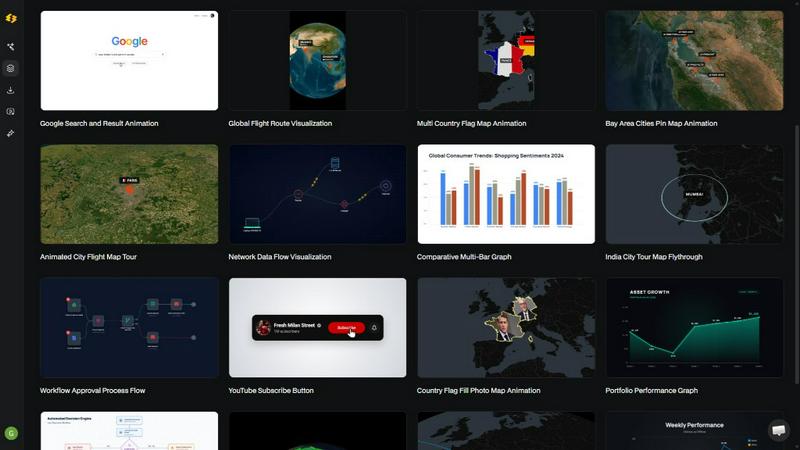
The platform offers powerful transformation capabilities that turn static assets into dynamic video content. Users can upload images and let the AI bring them to life with stunning motion effects, or import CSV and XLSX spreadsheet files to automatically generate animated data visualizations such as bar charts, line graphs, and pie charts. This feature is particularly valuable for data storytellers and marketers who need to present complex information in an engaging, scroll-stopping format, as it eliminates the tedious process of manually creating each animated element from scratch and ensures consistent visual quality across all projects.
Comprehensive Map Animation Studio
Easymotion includes a dedicated map animation maker that supports a wide range of geographic storytelling formats. Users can create flight route animations with curved paths between cities, add location pins with pop-up information, highlight specific countries or regions with flag fill effects, and build multi-stop travel visualizations. The map engine supports global and regional views, allowing creators to produce everything from globe fly-through sequences to detailed city-level animations. This feature is especially useful for travel content creators, logistics companies, news organizations, and educators who need to communicate spatial information in a visually compelling way.
Flexible Export and Aspect Ratio Support
The platform provides comprehensive export options designed for modern content distribution workflows. Users can export finished animations as MP4 files for standard video sharing or MOV files with transparent alpha channels, which can be dropped directly into editing software like Premiere Pro or Final Cut Pro for further compositing. Easymotion supports all major social media aspect ratios including 16:9 for YouTube and landscape content, 9:16 for TikTok and Instagram Reels, 1:1 for square social posts, and 4:5 for feed-friendly vertical formats. This flexibility ensures that creators can produce platform-optimized content without needing to manually resize or reformat their animations.
Use Cases of Easymotion - AI Motion Graphic Generator
Social Media Content Creation for Creators and Influencers
Content creators and YouTubers can use Easymotion to rapidly produce engaging social media videos that drive higher engagement and viewership. The platform enables creators to generate animated intros, travel reels, milestone celebration videos, and promotional content for platforms like TikTok, Instagram, and YouTube without spending hours in complex editing software. With the ability to create videos in under five minutes and export in platform-specific aspect ratios, creators can maintain a consistent posting schedule while experimenting with different visual styles and formats, ultimately growing their audience and increasing their content output by up to three times compared to traditional workflows.
Marketing Campaign Production for Business Teams
Marketing teams can leverage Easymotion to ship campaigns on the same day, eliminating the bottleneck of waiting for designers or freelancers to produce motion graphics. Marketers can quickly create product promos, animated infographics, social media ads, and presentation visuals that stay on brand, iterating on colors, messaging, and pacing through simple chat commands. This self-service approach gives marketing departments the agility to respond to trends, test multiple creative variations, and produce localized content for different markets without exceeding budget constraints or missing campaign deadlines.
Data Visualization and Storytelling for Analysts and Educators
Data storytellers, analysts, and educators can transform static charts and spreadsheets into animated data visualizations that actually stop the scroll and drive audience engagement. By uploading CSV or XLSX files, users can automatically generate animated bar charts, line graphs, and flowcharts that reveal insights progressively, making complex information more accessible and memorable. This use case is particularly powerful for social media posts, where video content typically receives five times more engagement than static images, and for educational content where animated explanations help viewers understand trends and relationships more intuitively.
Client Deliverable Production for Video Editors and Agencies
Professional video editors and creative agencies can use Easymotion as a productivity multiplier, creating motion graphics and map animations three times faster than traditional methods. Editors can generate reusable assets like animated logos, lower thirds, map sequences, and data overlays with transparent backgrounds, then seamlessly integrate them into larger projects using any standard editing software. This workflow allows agencies to take on more projects, meet tighter deadlines, and offer motion graphics services to clients who previously could not afford custom animation work, all while maintaining professional quality and brand consistency.
Frequently Asked Questions
What is Easymotion and who is it for?
Easymotion is an AI-powered motion graphics generator that lets anyone create professional animated videos simply by chatting. It is designed for content creators, video editors, marketing teams, startup founders, and data storytellers who need to produce motion graphics, map animations, data visualizations, and social media videos without using complex software like After Effects. The platform is particularly valuable for users who want to create videos in under five minutes and iterate on designs rapidly without manual keyframe editing.
How does the AI motion graphics generation process work?
The process works in three simple steps. First, you describe the animation you want in plain English, such as "Create a flight route animation from London to Tokyo" or "Turn this spreadsheet into an animated bar chart." Second, you refine the result using chat commands to adjust colors, timing, map styles, labels, or visual assets. Finally, you export your completed video as an MP4 or MOV file with a transparent background. The AI handles all the complex animation work including keyframes, easing curves, and transitions.
What types of videos can I create with Easymotion?
You can create a wide variety of motion graphics including SaaS product promos, animated flowcharts, data visualizations like bar charts and line graphs, UI explainers, quizzes, and social media videos. The platform also specializes in map animations such as flight routes, location pins, country highlights, and globe fly-through sequences. Additionally, you can upload static images or PDFs and have the AI animate them, or start from a premium template library and customize the layout for your specific needs.
Can I export videos with transparent backgrounds for use in other editing software?
Yes, Easymotion supports exporting videos as MOV files with transparent alpha channels, allowing you to drop the animations directly into editing software like Adobe Premiere Pro, Final Cut Pro, or DaVinci Resolve for further compositing. This feature is essential for video editors who need to layer motion graphics over existing footage, create animated overlays, or build complex multi-element compositions without losing quality or spending time on manual masking.
Explore more in this category:
Similar to Easymotion - AI Motion Graphic Generator

Qwen Image 2.1
Qwen Image 2.1 is an AI image-generation and editing studio for turning ideas into visuals. Create new images, refine references, explore transparent

CloneWebsite
Clone any webpage pixel-perfect, export HTML/CSS/ZIP or React/Vue components.

ImageAgent
Create and edit AI images through conversation, using text or reference images and refining results in chat.

airapvideo
AI rap video generator that turns two portraits into a short, lip-synced vertical music video with movement, sound, and a shared stage.

GenX
All-in-one AI workspace to generate images, videos, and audio with multiple leading AI models.

Bloom
An adaptive AI tutor that turns topics or your materials into courses, lessons, and answers tailored to how you learn.

AppIconGenerator
Generate iOS and Android app icons from any image and export all platform sizes for free.
