

QuickData.ai
QuickData.ai automates rent roll and T12 data entry into Excel, saving underwriters 15 hours each month.
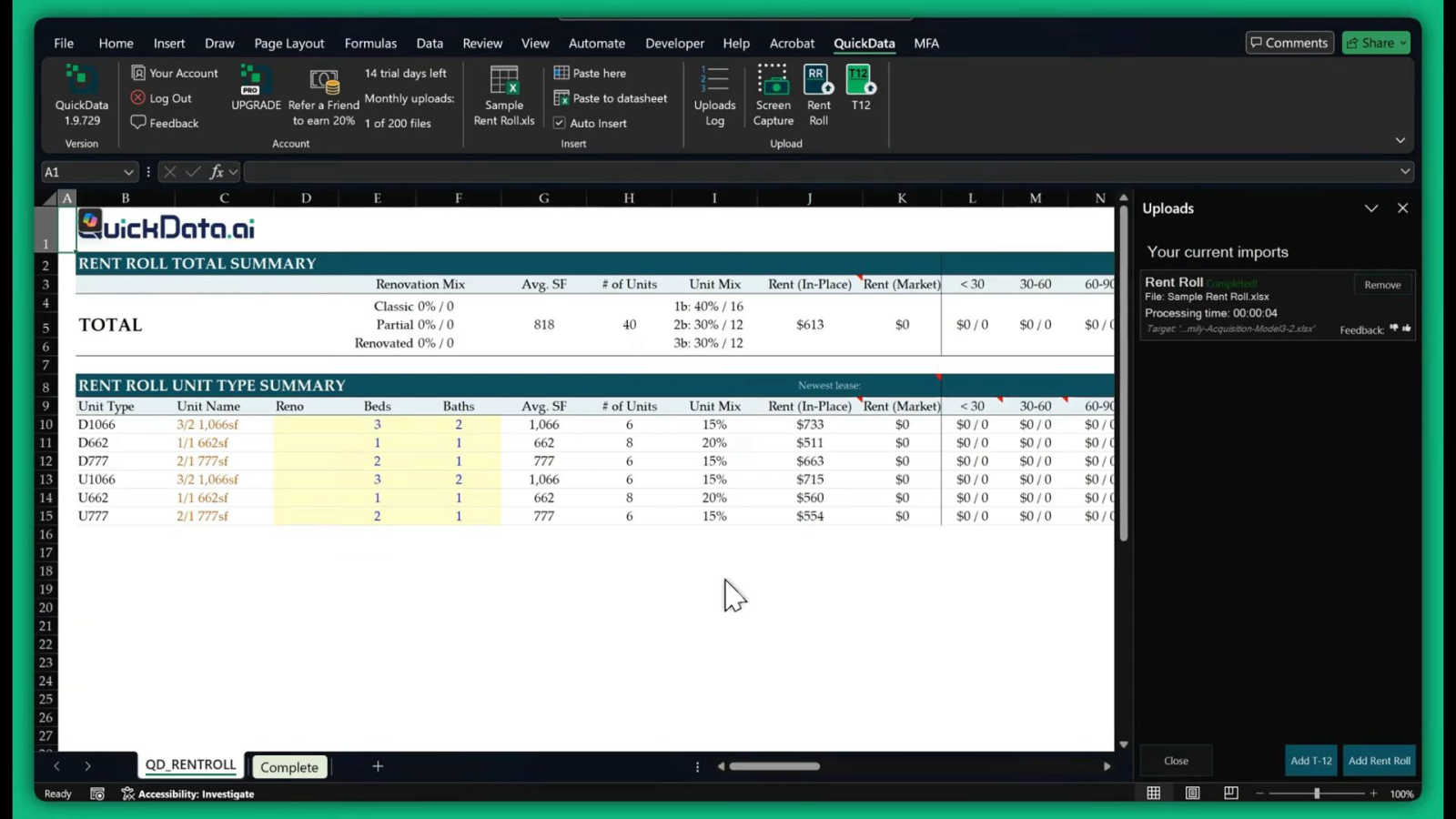
About QuickData.ai
QuickData.ai is a transformative solution in the multifamily real estate underwriting landscape, designed to streamline and enhance the data extraction process. This advanced Excel add-in leverages specialized artificial intelligence to automate the analysis of critical financial information from complex, unstructured documents such as rent rolls, trailing twelve-month (T12) statements, and offering memorandums (OMs). By alleviating the burden of manual data entry, QuickData.ai empowers professionals in acquisitions teams, commercial brokerage, lending institutions, and accounting firms to focus on strategic decision-making rather than time-consuming data transcription. The platform's main value proposition lies in its ability to drastically reduce the time spent on data extraction—saving users an average of 15 hours each month—while simultaneously minimizing human error. This efficiency enables users to analyze a higher volume of potential acquisitions and make informed decisions with greater confidence. QuickData.ai is engineered for those who demand precision and speed in their financial modeling processes, marking a significant shift towards intelligent workflows in the commercial real estate sector.
Features of QuickData.ai
Multifamily Excel Model
The Multifamily Excel Model feature allows users to integrate QuickData.ai directly into their existing Excel spreadsheets. This seamless integration ensures that extracted data is automatically populated into the appropriate fields, enhancing workflow efficiency and accuracy.
Automated Data Extraction
QuickData.ai excels at automating the extraction of critical financial data from complex documents. By processing rent rolls, T12 statements, and OMs, it eliminates the need for tedious manual entry, allowing users to focus on higher-value tasks.
14 Day Free Trial
To facilitate user onboarding, QuickData.ai offers a 14-day free trial. This allows potential customers to explore the extensive capabilities of the tool without any financial commitment, making it easier to assess its value for their specific needs.
One-on-One Onboarding Support
QuickData.ai provides personalized onboarding support to ensure users can quickly and effectively set up the tool. With free one-on-one sessions, users receive tailored guidance, enabling them to harness the full potential of the product from day one.
Use Cases of QuickData.ai
Streamlining Underwriting Processes
Real estate professionals can utilize QuickData.ai to significantly expedite their underwriting processes. By automating data entry, users can swiftly analyze multiple deals, enhancing overall productivity and decision-making speed.
Enhancing Financial Modeling Accuracy
With QuickData.ai, users can ensure that their financial models are populated with accurate, structured data. This precision reduces the likelihood of errors that often accompany manual data entry, leading to more reliable financial analyses.
Increasing Deal Volume Analysis
By saving valuable time on data extraction, real estate teams can evaluate a higher volume of potential acquisitions. This increased capacity allows them to explore more opportunities and ultimately drives better investment decisions.
Supporting Financial Reporting
QuickData.ai simplifies the financial reporting process for accounting firms and real estate professionals. With accurate data readily available in Excel, users can quickly generate reports and insights, improving communication with stakeholders.
Frequently Asked Questions
How does QuickData.ai integrate with existing Excel models?
QuickData.ai serves as an add-in for Excel, allowing users to seamlessly integrate automated data extraction into their current financial models without any disruption to existing workflows.
What types of documents can QuickData.ai process?
QuickData.ai can effectively process a variety of unstructured documents, including rent rolls, trailing twelve-month (T12) statements, and offering memorandums (OMs) to extract vital financial information.
Is there a commitment required to use the free trial?
No commitment is required to access the 14-day free trial of QuickData.ai. Users can cancel at any time during the trial period without any financial obligation.
What kind of support does QuickData.ai offer during onboarding?
QuickData.ai provides personalized, one-on-one onboarding support to all new users. This ensures that they are equipped with the knowledge and tools necessary to maximize the benefits of the software from the outset.
Explore more in this category:
Similar to QuickData.ai


IZIPAY
IZIPAY is a virtual and physical crypto card service that lets users top up with digital assets and pay online like with a regular card.


benchmark.directory
AI tools written up by the people who paid for them. Pricing, integrations, data policy and the limit we hit in a week of use.

saasgrow.ai
The shortcut to the right SaaS. Screened growth tools, organised by category, with nothing sponsored and nothing bought.

Tools Network
Tools Network is a curated directory that brings the internet's best AI tools together in one organized place.